
一、所选主题和项目介绍
1.1 项目背景
在物联网应用场景中,多设备协同称重是一个常见需求。传统的称重系统通常只能显示本地传感器数据,无法集中监控多个分布在不同位置的称重设备。本项目使用M5Stack Tab5开发板,实现一款多设备称重监控终端,能够自动发现本地I2C称重传感器,并通过MQTT协议订阅来自其他桥接设备(AtomS3R、Cardputer、CoreS3等)的重量数据,在2x2网格界面上集中显示,实现分布式称重系统的统一监控。
1.2 项目目标
本项目使用M5Stack Tab5开发板,实现一款多设备称重监控终端,主要功能如下:
- 本地传感器自动发现:自动扫描I2C总线,发现并连接Unit Mini Scales称重传感器
- MQTT远程数据订阅:通过MQTT协议订阅多个桥接设备的重量数据
- 2x2网格UI显示:在1280x720屏幕上实时显示4个设备的称重数据
- 设备状态监控:自动检测设备在线/离线状态,15秒超时标记为离线
- MQTT数据发布:将本地称重数据发布到MQTT服务器供其他设备订阅
1.3 创新点
- 自动传感器发现:自动扫描I2C总线,无需手动配置传感器地址
- 动态设备分配:按接收顺序自动分配显示格子,优先替换离线设备
- 多桥接设备协同:支持AtomS3R、Cardputer、CoreS3等多种设备作为桥接器
- 统一MQTT主题规范:所有设备使用统一主题格式,便于扩展和管理
- 离线超时检测:15秒无数据自动标记设备为离线,实时反映设备状态
二、硬件介绍
2.1 主控设备
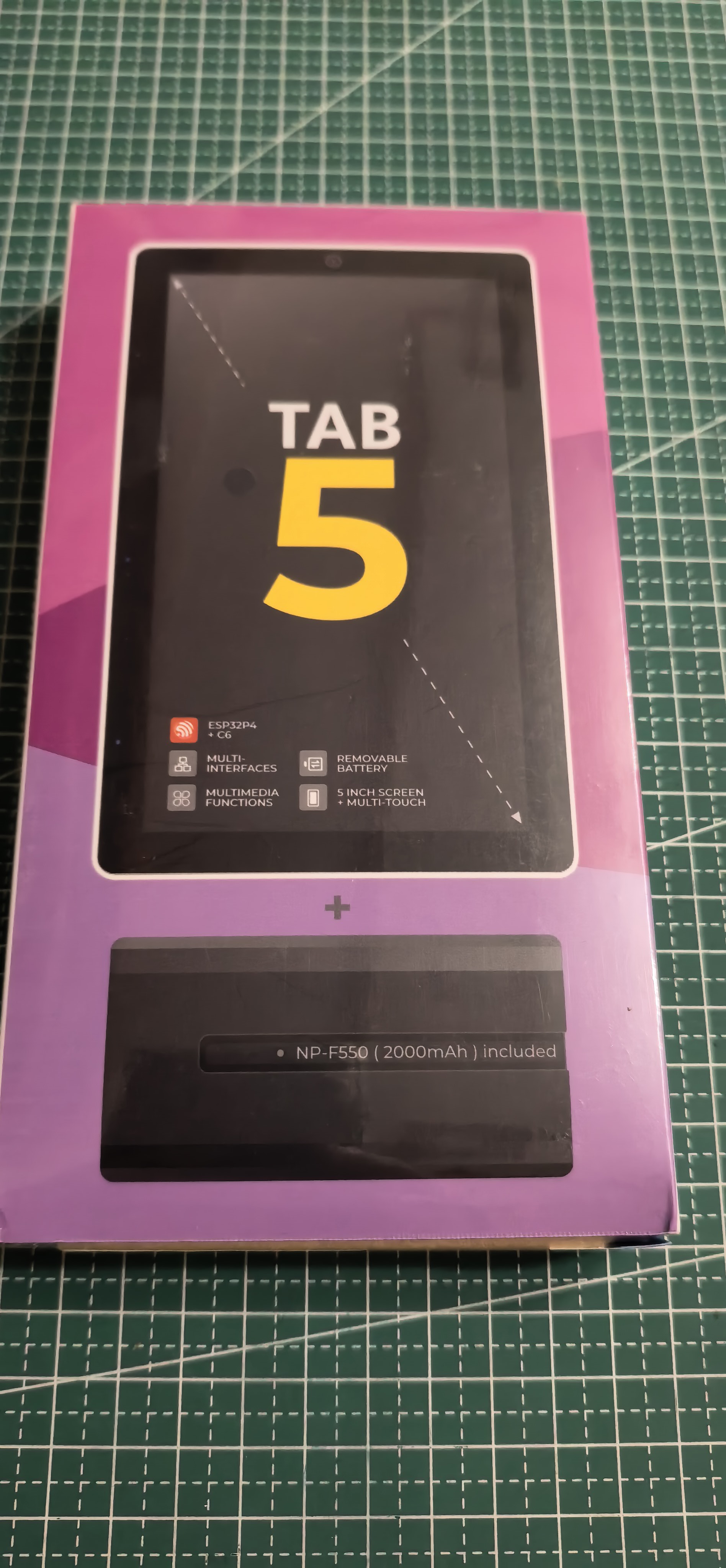

M5Stack Tab5 — 基于ESP32-S3的5英寸触控屏开发板,配备1280x720 IPS显示屏、Grove扩展接口,支持WiFi和I2C通信。
参数 | 规格 |
|---|---|
主控芯片 | ESP32-S3,双核240MHz |
Flash | 16MB |
显示屏 | 5英寸 IPS,1280x720 |
扩展接口 | Grove HY2.0-4P (PORT.A)、USB-C |
触控 | 电容式触控屏 |
2.2 传感器模块
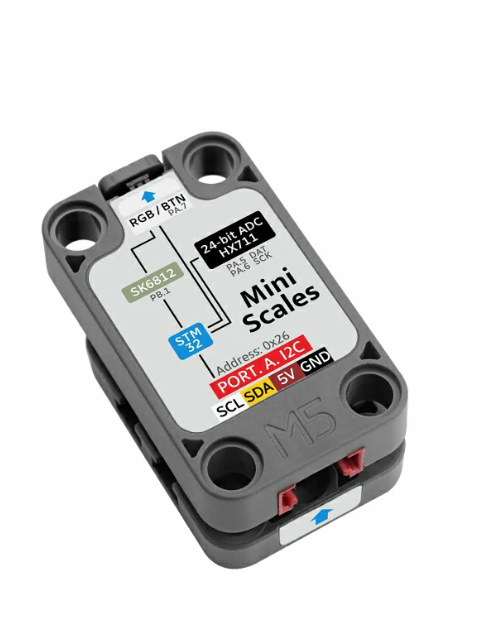
Unit Mini Scales 称重传感器 (SKU:U177) — 基于I2C接口的称重模块,量程0-5kg,精度0.1g,默认地址0x26(可配置0x26-0x2D)。
参数 | 规格 |
|---|---|
量程 | 0-5kg |
精度 | 0.1g |
通信接口 | I2C |
默认地址 | 0x26 |
可配置地址 | 0x26-0x2D |
2.3 硬件连接
Tab5引脚 | Mini Scales引脚 | 功能 |
|---|---|---|
PORTA_SDA (G53) | SDA | I2C数据线 |
PORTA_SCL (G54) | SCL | I2C时钟线 |
3.3V | VCC | 电源正极 |
GND | GND | 电源地 |
┌─────────────────────────────────────────────────────────────────────────┐
│                           Tab5 主控板                                    │
│  ┌─────────┐  ┌─────────┐  ┌─────────┐  ┌─────────┐  ┌─────────┐      │
│  │ESP32-S3 │  │  5" IPS │  │ 触控    │  │USB-C    │  │PORT.A   │      │
│  │主控芯片  │  │显示屏    │  │屏幕     │  │接口     │  │I2C接口  │      │
│  └────┬────┘  └─────────┘  └─────────┘  └─────────┘  └────┬────┘      │
│       │                                                        │          │
│       │ WiFi                                                   │ I2C      │
│       │                                                        │          │
└───────┼────────────────────────────────────────────────────────┼──────────┘
        │                                                        │
        │ MQTT                                                   │
        │                                                        │
        ▼                                                        ▼
┌───────────────────┐                              ┌─────────────────────┐
│   MQTT Broker     │                              │   Mini Scales传感器 │
│   (broker.emqx.io)│                              │   (本地I2C)         │
│                   │                              │                     │
│  ┌─────────────┐  │                              │  ┌───────────────┐  │
│  │数据转发     │  │                              │  │ 0x26 - 本地   │  │
│  │数据订阅     │  │                              │  │ 0x27 - 扩展1  │  │
│  └─────────────┘  │                              │  └───────────────┘  │
└───────────────────┘                              └─────────────────────┘
         ▲
         │
         │ MQTT
         │
┌────────┴────────┐  ┌────────┴────────┐  ┌────────┴────────┐
│  AtomS3R-CAM    │  │  Cardputer      │  │  CoreS3         │
│  桥接设备        │  │  桥接设备        │  │  桥接设备        │
│  (I2C:0x26)     │  │  (I2C:0x26)     │  │  (I2C:0x26)     │
└─────────────────┘  └─────────────────┘  └─────────────────┘
三、方案框图和项目设计思路
3.1 系统架构
                           ┌─────────────────┐
                           │  MQTT Broker    │
                           │ broker.emqx.io  │
                           └────────┬────────┘
                                    │
                    ┌───────────────┼───────────────┐
                    │               │               │
                    ▼               ▼               ▼
              ┌──────────┐   ┌──────────┐   ┌──────────┐
              │ AtomS3R  │   │Cardputer │   │  CoreS3  │
              │ 桥接设备  │   │ 桥接设备  │   │ 桥接设备  │
              │ I2C:0x26 │   │ I2C:0x26 │   │ I2C:0x26 │
              └────┬─────┘   └────┬─────┘   └────┬─────┘
                   │              │              │
                   │ MQTT发布      │ MQTT发布      │ MQTT发布
                   │              │              │
                   └──────────────┼──────────────┘
                                  │
                                  ▼
                    ┌─────────────────────────┐
                    │       Tab5 监控端        │
                    │  ┌─────┬─────┬─────┐    │
                    │  │本地  │001  │002  │    │
                    │  ├─────┼─────┼─────┤    │
                    │  │003  │空   │空   │    │
                    │  └─────┴─────┴─────┘    │
                    │  2x2 网格显示            │
                    └─────────────────────────┘
                                  │
                                  │ I2C
                                  ▼
                    ┌─────────────────────────┐
                    │   Mini Scales传感器      │
                    │   (本地I2C连接)          │
                    └─────────────────────────┘
3.2 设备启动流程
                    ┌─────────────┐
                    │   设备启动   │
                    └──────┬──────┘
                           │
                           ▼
                    ┌─────────────┐
                    │ 初始化M5    │
                    │ 设置横屏    │
                    └──────┬──────┘
                           │
                           ▼
                    ┌─────────────┐
                    │ 初始化I2C   │
                    │ PORT.A      │
                    └──────┬──────┘
                           │
                           ▼
                    ┌─────────────┐
                    │ 扫描I2C设备 │
                    │ 发现传感器  │
                    └──────┬──────┘
                           │
                           ▼
                    ┌─────────────┐
                    │  连接WiFi   │
                    │ (自动连接)   │
                    └──────┬──────┘
                           │
                           ▼
                    ┌─────────────┐
                    │ 连接MQTT    │
                    │ 订阅主题    │
                    └──────┬──────┘
                           │
                           ▼
                    ┌─────────────┐
                    │  主循环运行  │
                    │ 读取本地    │
                    │ 订阅远程    │
                    │ 更新显示    │
                    └─────────────┘
3.3 设备离线检测机制
采用超时检测机制:
- 记录最后接收时间:每次收到设备数据时记录时间戳
- 超时判定:超过15秒无数据则标记为离线
- 状态更新:离线时显示重量归零,状态标记为"offline"
四、原理图和PCB展示及介绍
4.1 硬件连接原理图
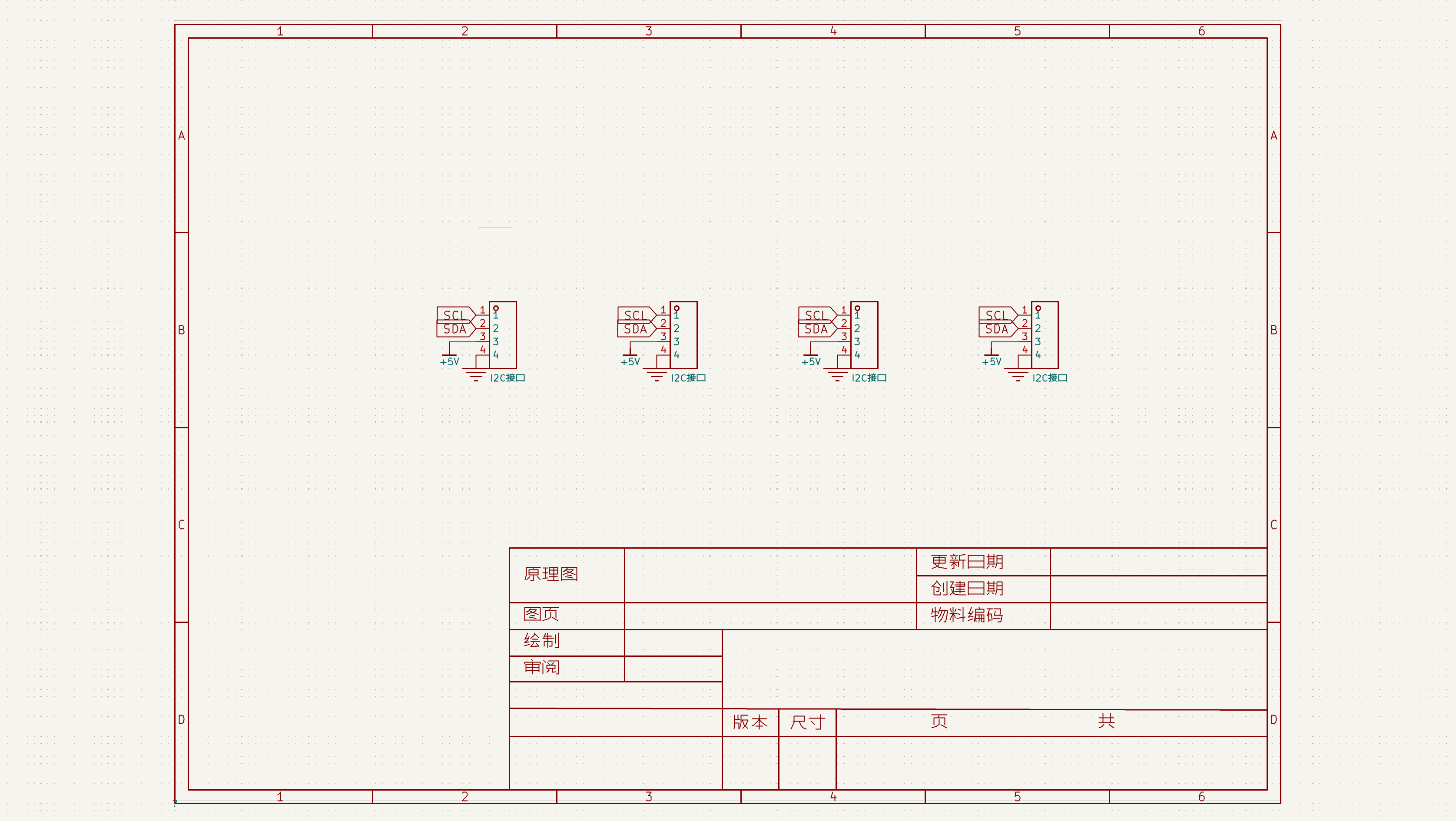
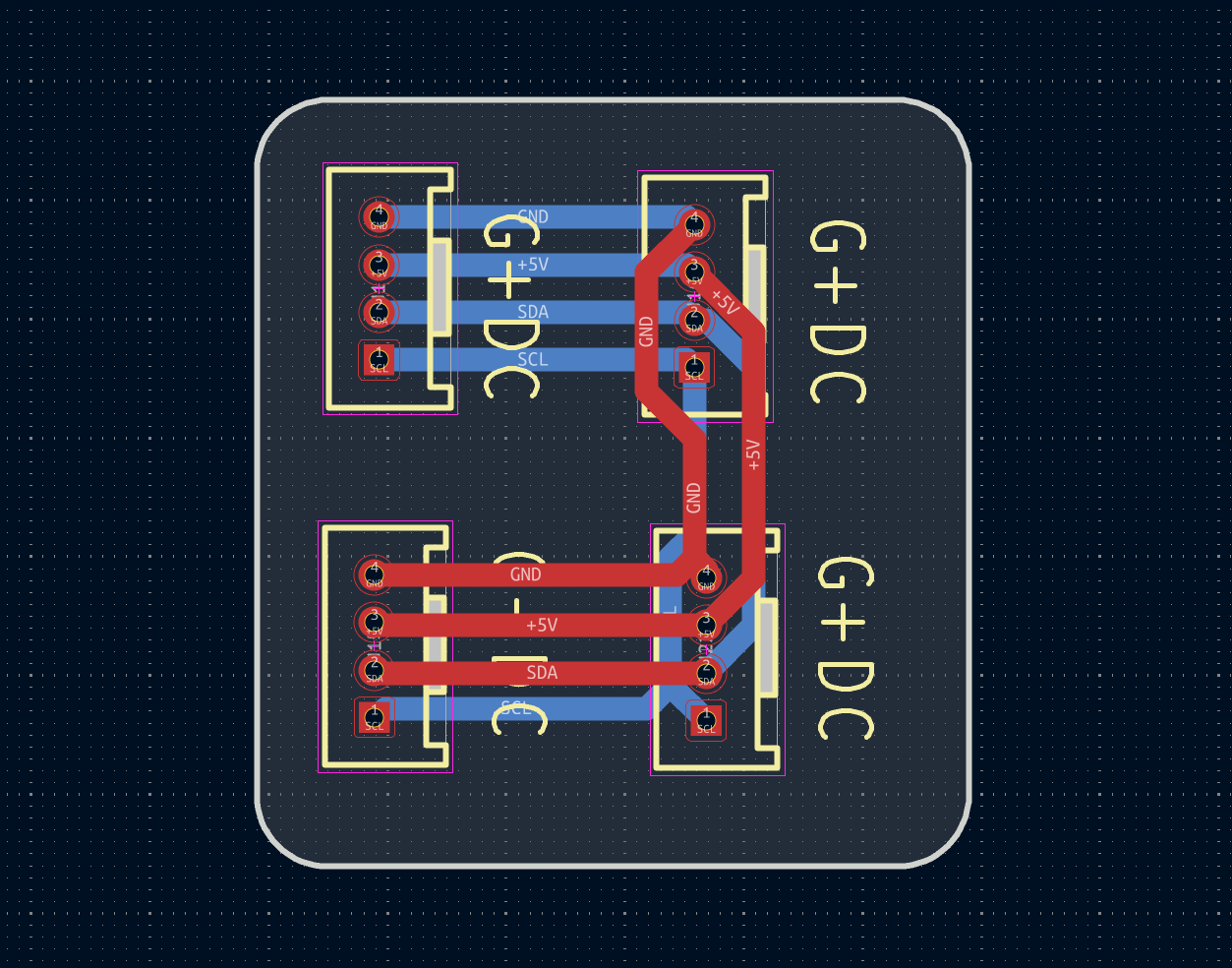
本项目使用M5Stack官方硬件,硬件连接采用I2C总线方式。Tab5通过PORT.A接口通过连接器连接Mini Scales传感器。
📷 硬件连接器原理图:见附件
                    Tab5 (PORT.A)
                   ┌───────────┐
                   │           │
    3.3V ──────────┤ 3V3       │
                   │           │
    GND  ──────────┤ GND       │
                   │           │
    SCL  ──────────┤ G54       │
                   │           │
    SDA  ──────────┤ G53       │
                   │           │
                   └───────────┘
                         │
                         │ I2C总线
                         │
                    ┌────┴────┐
                    │MiniScale│
                    │  0x26   │
                    │ 本地称重 │
                    └─────────┘
4.2 I2C地址扫描
Tab5支持自动扫描I2C总线上的所有设备:
def scan_all_i2c_devices():
    devices = []
    if i2c0 is None:
        return devices

    print("[SCAN] 扫描所有 I2C 设备...")
    devices = i2c0.scan()
    for addr in devices:
        print("  [FOUND] 0x{:02X}".format(addr))
    print("[SCAN] 找到 {} 个设备".format(len(devices)))
    return devices

def discover_weight_sensors():
    sensors = []
    if i2c0 is None:
        print("[ERROR] I2C 未初始化")
        return sensors

    print("[DISCOVER] 搜索称重传感器...")
    devices = scan_all_i2c_devices()

    for addr in devices:
        if addr in KNOWN_WEIGHT_SENSOR_ADDRESSES:
            try:
                sensor_unit = MiniScaleUnit(i2c0, address=addr)
                time.sleep(0.1)
                weight = sensor_unit.weight
                if weight is not None and -10000 < weight < 100000:
                    sensor = dict()
                    sensor['addr'] = addr
                    sensor['name'] = "device_{:02X}".format(addr)
                    sensor['topic'] = "{}/device_{:02X}/weight".format(MQTT_TOPIC_PREFIX, addr)
                    sensor['unit'] = sensor_unit
                    sensors.append(sensor)
                    print("  [SENSOR] 0x{:02X} weight: {}g".format(addr, weight))
            except Exception as e:
                print("  [ERROR] 0x{:02X} failed: {}".format(addr, e))
        else:
            print("  [UNKNOWN] 0x{:02X}".format(addr))

    print("[DISCOVER] 找到 {} 个称重传感器".format(len(sensors)))
    return sensors
五、软件流程图和关键代码介绍
5.1 主程序结构
"""
UIFlow2 单文件应用
Tab5 + Unit Mini Scales 称重显示系统
2x2 网格显示,显示本地和远程称重数据,I2C地址自动扫描
"""
5.2 MQTT 消息处理
def mqtt_event(topic, msg):
    global remote_weights, remote_states, remote_devices, remote_last_time

    try:
        if type(topic) == bytes:
            topic_str = topic.decode()
        else:
            topic_str = str(topic)

        if type(msg) == bytes:
            msg_str = msg.decode()
        else:
            msg_str = str(msg)

        print("[MQTT RX] {} : {}".format(topic_str, msg_str))

        data_payload = json.loads(msg_str)
        weight_val = float(data_payload.get('weight', 0.0))

        device_id = data_payload.get('device_id', '')
        if type(device_id) == bytes:
            device_id = device_id.decode()
        else:
            device_id = str(device_id)

        if len(device_id) == 0:
            parts = topic_str.split('/')
            if len(parts) >= 3:
                device_id = parts[-2]

        now = time.time()

        found = False
        for i in range(4):
            if remote_devices[i] == device_id:
                remote_weights[i] = weight_val
                remote_states[i] = "online"
                remote_last_time[i] = now
                found = True
                break

        if not found:
            # 优先替换离线的格子
            for i in range(4):
                if remote_states[i] == "offline" or remote_devices[i] == "":
                    remote_devices[i] = device_id
                    remote_weights[i] = weight_val
                    remote_states[i] = "online"
                    remote_last_time[i] = now
                    found = True
                    print("[MQTT] New device {} in slot {}".format(device_id, i))
                    break
    except Exception as e:
        print("[MQTT RX] Error:", e)
5.3 UI 显示更新
def update_display():
    screen_w = 1280
    screen_h = 720
    cols = 2
    rows = 2
    gap = 8
    margin = 8
    cell_w = (screen_w - margin * 2 - gap * (cols - 1)) // cols
    cell_h = (screen_h - margin * 2 - gap * (rows - 1)) // rows

    bg_colors = [0x2d3748, 0x1a365d, 0x1a3a2a, 0x3d1a1a]

    for i in range(4):
        row = i // cols
        col = i % cols
        x = margin + col * (cell_w + gap)
        y = margin + row * (cell_h + gap)
        bg = bg_colors[i]

        M5.Lcd.fillRect(x, y + 100, cell_w, cell_h - 100, bg)

        device_id = remote_devices[i] if remote_devices[i] else "---"
        weight_val = remote_weights[i]
        state = remote_states[i]

        M5.Lcd.setTextColor(0x718096, bg)
        M5.Lcd.setTextSize(5)
        M5.Lcd.setCursor(x + 20, y + 70)
        M5.Lcd.print("ID: {}".format(device_id))

        M5.Lcd.setTextColor(0x68d391, bg)
        M5.Lcd.setTextSize(5)
        M5.Lcd.setCursor(x + 20, y + cell_h // 2 - 30)
        M5.Lcd.print("{:.1f} g".format(weight_val))

        M5.Lcd.setTextColor(0xfbd38d, bg)
        M5.Lcd.setTextSize(5)
        M5.Lcd.setCursor(x + 20, y + cell_h - 35)
        M5.Lcd.print("Status: {}".format(state))
5.4 MQTT 数据发布
def publish_mqtt(data_list):
    global mqtt_client
    if mqtt_client is None:
        return

    for d in data_list:
        try:
            payload = json.dumps({
                "weight": d['weight'],
                "unit": "g",
                "timestamp": int(time.time() * 1000),
                "device_id": d['name'],
                "status": "normal"
            })
            topic = "{}/{}/weight".format(MQTT_TOPIC_PREFIX, d['name'])
            mqtt_client.publish(topic, payload, qos=0)
            print("[MQTT TX] {}: {:.1f} g".format(topic, d['weight']))
        except Exception as e:
            print("[MQTT ERROR]", e)
5.5 主循环
def loop():
    global last_publish_time, last_reconnect_time, last_display_time, mqtt_client

    M5.update()
    current_time = time.time()

    # 检查 WiFi 状态
    wlan = network.WLAN(network.STA_IF)
    if not wlan.isconnected():
        time.sleep(1)
        return

    # MQTT 重连机制(每5秒尝试一次)
    if mqtt_client is None and (current_time - last_reconnect_time >= 5):
        last_reconnect_time = current_time
        try:
            mac = ubinascii.hexlify(wlan.config('mac')).decode()
            unique_client_id = "{}_{}".format(MQTT_CLIENT_ID, mac)

            mqtt_client = MQTTClient(unique_client_id, MQTT_SERVER, port=1883, user='', password='', keepalive=60)
            mqtt_client.connect()
            mqtt_client.set_callback(mqtt_event)
            mqtt_client.subscribe(b"scales/bridge/+/weight")
            print("[OK] MQTT 重连成功")
        except Exception as e:
            print("[MQTT] 重连失败:", e)
            mqtt_client = None

    # 处理 MQTT 消息
    if mqtt_client:
        try:
            mqtt_client.check_msg()
        except Exception as e:
            print("[MQTT] check_msg 错误:", e)
            mqtt_client = None

    # 检查设备离线超时(15秒无数据则标记为offline)
    for i in range(4):
        if remote_states[i] == "online" and remote_last_time[i] > 0:
            if current_time - remote_last_time[i] >= OFFLINE_TIMEOUT:
                print("[MQTT] Device {} offline (timeout {}s)".format(remote_devices[i], OFFLINE_TIMEOUT))
                remote_states[i] = "offline"
                remote_weights[i] = 0.0

    # 每2秒发布一次本地传感器数据
    if current_time - last_publish_time >= MQTT_PUBLISH_INTERVAL and len(weight_sensors) > 0:
        last_publish_time = current_time
        data_list = []
        for sensor in weight_sensors:
            weight = read_weight(sensor)
            if weight is not None:
                data_list.append({
                    'name': sensor['name'],
                    'addr': "0x{:02X}".format(sensor['addr']),
                    'weight': weight
                })
        if len(data_list) > 0:
            publish_mqtt(data_list)
    elif current_time - last_publish_time >= MQTT_PUBLISH_INTERVAL:
        last_publish_time = current_time

    # 每1秒刷新一次显示
    if current_time - last_display_time >= 1:
        last_display_time = current_time
        update_display()

    time.sleep(0.1)
六、硬件功能展示图及说明
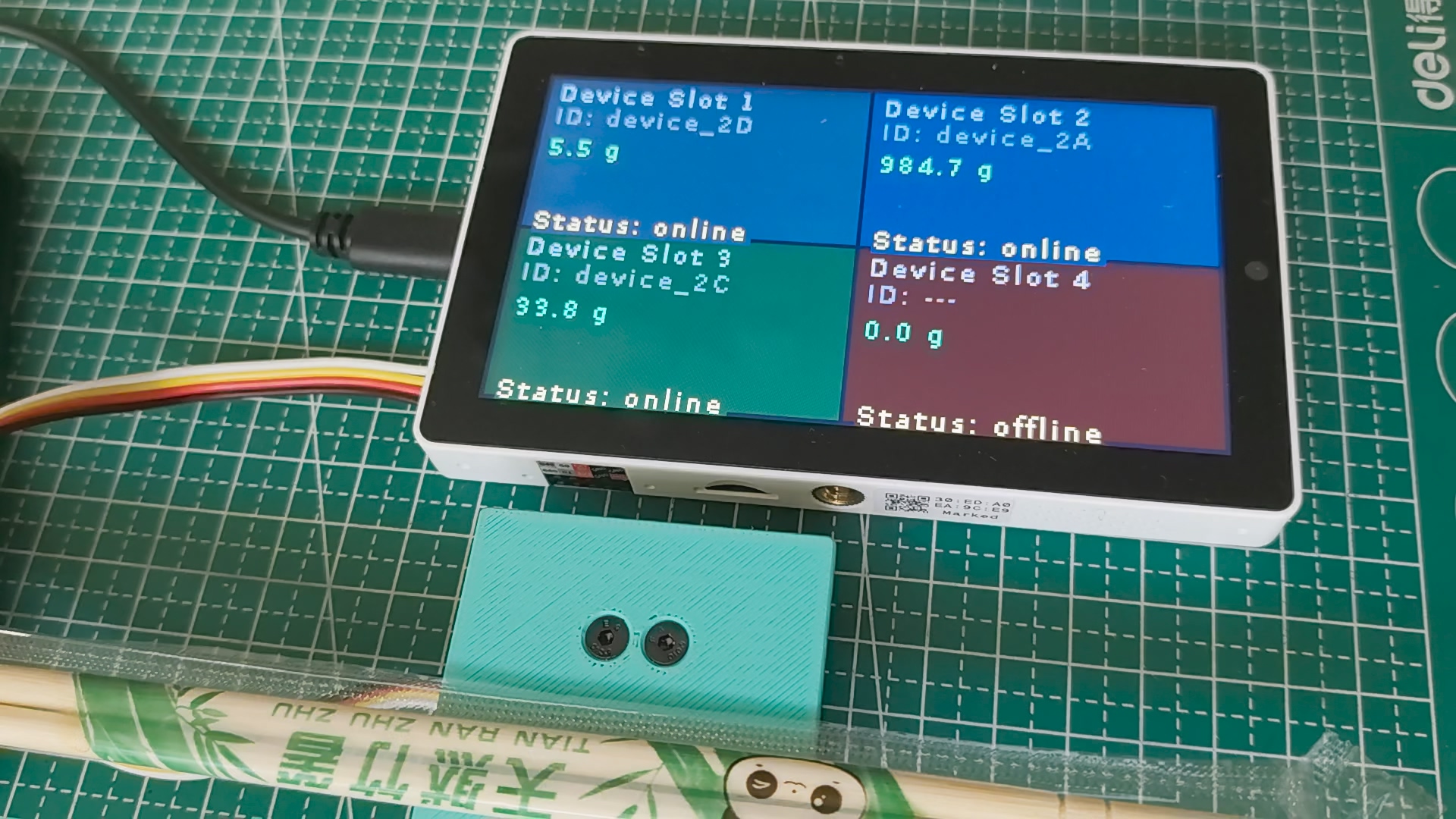
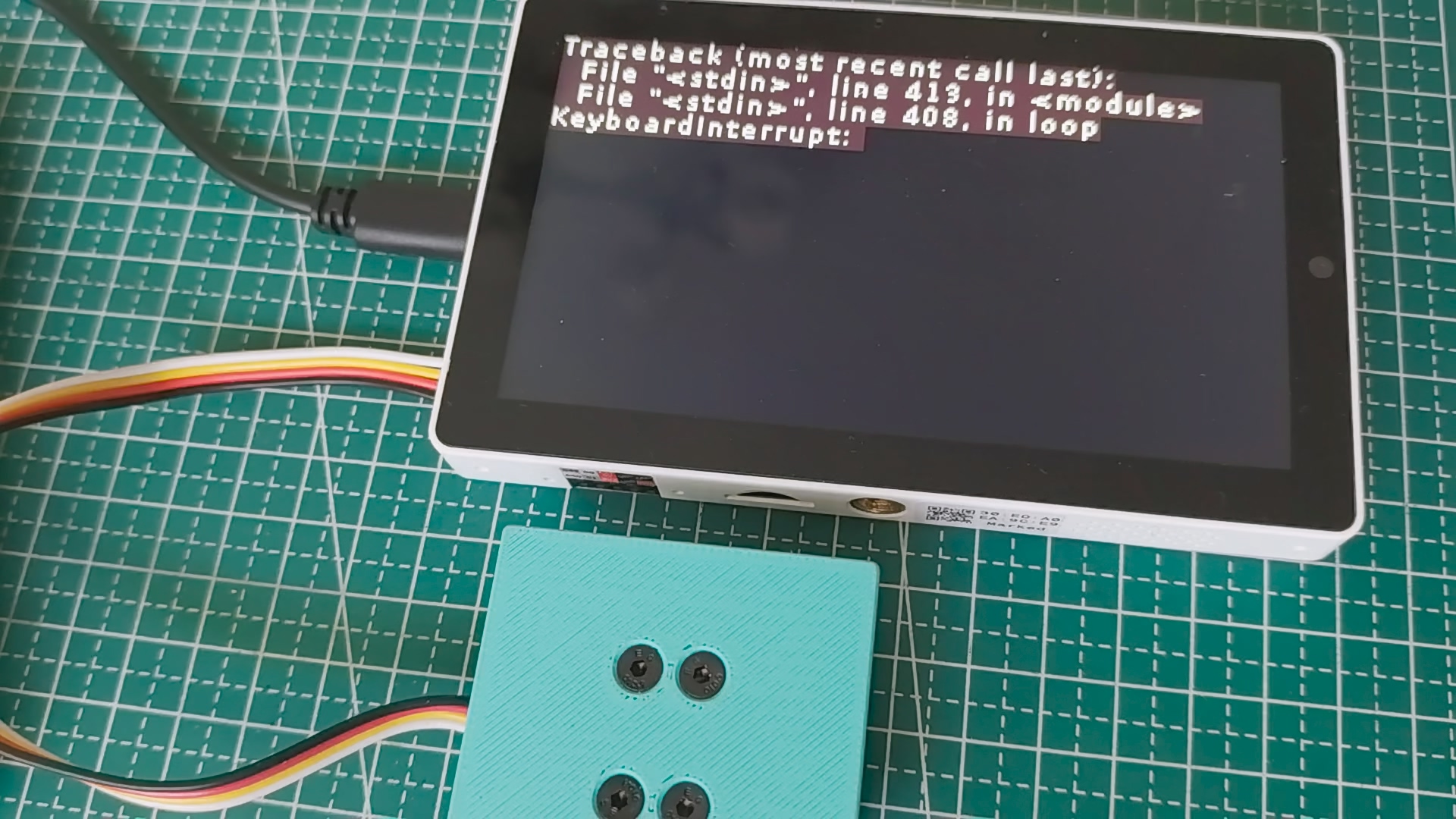
6.1 硬件整体展示
6.2 显示界面
6.2.1 启动界面
Weight Monitor System - Tab5
Device Slot 1          Device Slot 2
ID: ---                ID: ---
0.0 g                  0.0 g
Status: offline        Status: offline

Device Slot 3          Device Slot 4
ID: ---                ID: ---
0.0 g                  0.0 g
Status: offline        Status: offline
6.2.2 运行状态
Weight Monitor System - Tab5
Device Slot 1          Device Slot 2
ID: device_26          ID: device_001
125.3 g                456.7 g
Status: online         Status: online

Device Slot 3          Device Slot 4
ID: device_002         ID: device_003
89.2 g                 234.5 g
Status: online         Status: online
6.3 系统运行日志
==================================================
Tab5 Weight Monitor Starting...
==================================================
[OK] I2C (SDA:53, SCL:54)
[SCAN] 扫描所有 I2C 设备...
  [FOUND] 0x26
[SCAN] 找到 1 个设备
[DISCOVER] 搜索称重传感器...
  [SENSOR] 0x26 weight: 0g
[DISCOVER] 找到 1 个称重传感器
[OK] 1 个传感器

[WiFi] 连接中...
[OK] WiFi 已连接: 192.168.1.100

[MQTT] 连接中...
[MQTT] Client ID: tab5_monitor_AABBCCDDEEFF
[OK] MQTT (broker.emqx.io) - 已订阅 scales/bridge/+/weight

==================================================
开始运行...
==================================================

[MQTT RX] scales/bridge/device_001/weight : {"weight": 123.4, "unit": "g", ...}
[MQTT] New device device_001 in slot 0
[MQTT RX] scales/bridge/device_002/weight : {"weight": 456.7, "unit": "g", ...}
[MQTT] New device device_002 in slot 1
七、设计中遇到的难题和解决方法
7.1 umqtt.default vs umqtt.simple(关键问题)
问题描述:
Tab5订阅MQTT主题后,回调函数永远不会被调用,串口只显示 Warning: Comparison between bytes and str。
原因分析:
UIFlow2的 from umqtt import MQTTClient 导入的是 umqtt.default 模块,其 subscribe(topic, callback, qos=0) 方法内部做主题匹配时,收到的topic是bytes类型,而订阅时传入的topic是str类型,导致bytes vs str比较永远为False,回调不会被触发。
解决方案:
改用 umqtt.simple 模块,使用 set_callback() + subscribe() 方式:
# 错误写法(umqtt.default,有bytes vs str bug)
from umqtt import MQTTClient
mqtt_client.subscribe("scales/bridge/+/weight", mqtt_event, qos=0)

# 正确写法(umqtt.simple,稳定可靠)
from umqtt.simple import MQTTClient
mqtt_client.set_callback(mqtt_event)
mqtt_client.subscribe(b"scales/bridge/+/weight")
7.2 MQTT连接失败(错误码-202)
问题描述:
首次启动时MQTT连接经常失败,返回错误码-202。
原因分析:
WiFi刚建立连接时网络尚未稳定,DNS解析可能失败。
解决方案:
添加自动重连机制,每5秒尝试一次:
if mqtt_client is None and (current_time - last_reconnect_time >= 5):
    last_reconnect_time = current_time
    try:
        mac = ubinascii.hexlify(wlan.config('mac')).decode()
        unique_client_id = "{}_{}".format(MQTT_CLIENT_ID, mac)

        mqtt_client = MQTTClient(unique_client_id, MQTT_SERVER, port=1883, user='', password='', keepalive=60)
        mqtt_client.connect()
        mqtt_client.set_callback(mqtt_event)
        mqtt_client.subscribe(b"scales/bridge/+/weight")
        print("[OK] MQTT 重连成功")
    except Exception as e:
        print("[MQTT] 重连失败:", e)
        mqtt_client = None
7.3 MQTTClient初始化参数
问题描述:TypeError: extra keyword arguments given 或 function takes 4 positional arguments but 3 were given
解决方案:
使用关键字参数初始化:
mqtt_client = MQTTClient(unique_client_id, MQTT_SERVER, port=1883, user='', password='', keepalive=60)
7.4 回调函数中bytes vs str处理
问题描述:json.loads() 返回的 device_id 可能是bytes类型,与str比较时出错。
解决方案:
device_id = data_payload.get('device_id', '')
if type(device_id) == bytes:
    device_id = device_id.decode()
else:
    device_id = str(device_id)
7.5 循环频率优化
问题描述:time.sleep(0.1) 导致循环每0.1秒执行一次,串口输出和UI刷新过于频繁。
解决方案:
使用独立的时间间隔控制不同操作的频率:
# check_msg(): 每0.1秒 - 保持MQTT连接活跃
# 发布数据: 每2秒 - 读取传感器并发布到MQTT
# 刷新显示: 每1秒 - 更新屏幕UI
# 重连MQTT: 每5秒 - 仅在断开时尝试

if current_time - last_publish_time >= MQTT_PUBLISH_INTERVAL:
    # 读取传感器 + 发布

if current_time - last_display_time >= 1:
    # 刷新显示
要点:
check_msg()必须高频调用(0.1秒),否则MQTT消息会丢失- 传感器读取和发布可以低频(2秒),减少网络负载
- UI刷新1秒一次足够,避免屏幕闪烁
- 减少不必要的串口日志输出
7.6 设备按接收顺序分配格子
设计思路:
- 不跳过任何消息(包括自己发布的)
- 不判断设备ID/地址
- 按接收顺序分配格子,已有设备更新数据
- 超出4个格子的设备只在串口输出
- 优先替换离线的格子
八、心得体会
8.1 项目收获
- 物联网架构设计:深入理解了物联网系统的数据采集、转发和集中监控架构
- 传感器技术:掌握了I2C传感器通信和自动发现技术
- 嵌入式开发:熟悉了UIFlow2开发环境和MicroPython API
- 网络协议应用:实践了MQTT协议在物联网多设备协同中的应用
- UI设计:实现了2x2网格布局的实时数据显示界面
- 问题调试:解决了umqtt模块bytes vs str兼容性问题
8.2 技术亮点
- 自动传感器发现:自动扫描I2C总线,无需手动配置传感器地址
- 动态设备分配:按接收顺序自动分配显示格子,优先替换离线设备
- 多桥接设备协同:支持AtomS3R、Cardputer、CoreS3等多种设备作为桥接器
- 统一MQTT主题规范:所有设备使用统一主题格式,便于扩展和管理
- 离线超时检测:15秒无数据自动标记设备为离线
8.3 改进建议
- 增加本地传感器显示:在第一个格子显示本地Mini Scales数据
- 支持4x4网格:扩展到16个设备显示,支持更大规模的监控系统
- 增加告警功能:超重告警和设备离线告警
- 数据记录:增加历史数据记录和趋势显示
- 安全认证:增加MQTT用户名密码认证,提高数据安全性
- 本地配置:增加Web配置界面,支持WiFi和MQTT参数配置
- OTA升级:支持远程固件升级
- 降低功耗:实现低功耗模式,延长电池寿命
- 增加ESP-NOW:支持ESP-NOW局域网通信,减少对云端MQTT的依赖
创意方向关联
本项目的技术创新为以下创意方向提供了新的思路:
1. 人工智能在嵌入式系统中的应用
本项目的传感器数据处理技术为AI应用提供了基础:
- 故障保护:人工智能判断:设备状态监测可发展为AI驱动的设备健康预警系统
- 数据分析:结合AI算法实现称重数据异常检测和趋势预测
- 智能识别:识别称重模式,自动分类物品
2. 楼宇自动化
称重监控节点是楼宇自动化的核心组件:
- 库存管理:监测仓库物品重量,实现智能库存管理
- 设备状态监测:监测楼宇设备运行状态
- 能源管理:监测设备能耗,实现智能节能
- 预测性维护:提前预警设备故障
3. 无线 / 5G / WiFi-7
项目集成的MQTT通信功能:
- 无线连接在智能建筑中的应用:MQTT是智能建筑数据传输的标准协议
- 5G物联网:MQTT架构可迁移到5G物联网终端开发
- WiFi-7技术储备:高速无线通信实现实时数据上报
技术迁移价值
本项目开发的技术方案可迁移到:
- 人工智能应用:设备健康预警、异常检测、智能分类
- 楼宇自动化:库存管理、设备监测、能源管理、预测性维护
- 无线通信:MQTT物联网、5G终端、ESP-NOW局域网
致谢
感谢 DigiKey 和 电子森林 提供的FastBond4活动支持,本次活动链接:https://www.eetree.cn/page/digikey-fastbond


 StreakingJerry星舰数据枢纽琪琳六坝