

本次活动的PIC32CM LS00 Curiosity Nano+ Touch Evaluation Kit是一款板载资源丰富的开发板,内核、RAM和存储的参数如下。
Parameter | Value |
|---|---|
Part Family | PIC32CM LS00 |
CPU Type | Cortex-M23 |
Max Speed (MHz) | 48 |
Program Memory Size (KB) | 512 |
SRAM (KB) | 64 |
本项目利用芯片的USB控制器,实现USB从站设备,通过USB通讯,实现上位机板载IO信号的监控功能。
1、功能介绍
USB(Universial Serial Bus)通用串行总线,是嵌入式中常见的通讯接口。USB协议相关的资料可以在USB-IF标准网页找到相关的资料。
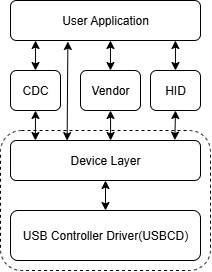
项目实现的功能需要USB用于数据通讯,LED和按键作为IO设备。实现USB协议中的Vendor设备用于实现上述自定义功能。程序的软件栈可以用下图表示,其中虚线框中的部分为厂商提供的USB硬件驱动软件,用户在此基础上实现Vendor Class和用户程序部分即可。
2、功能实现
Microchip提供MPLAB X集成开发环境、MCC 代码配置工具,用于PIC32CM LS00 Curiosity Nano+ Touch Evaluation Kit开发。提供硬件配置、软件栈管理、代码管理等功能。
2.1 硬件配置
MPLAB X中的MCC Harmony代码配置工具用于管理32bit MCU开发所需安装的软件组件和MCU硬件配置。关于MCC Harmoy软件的具体功能说明,Microchip官方提供具体的使用说明。
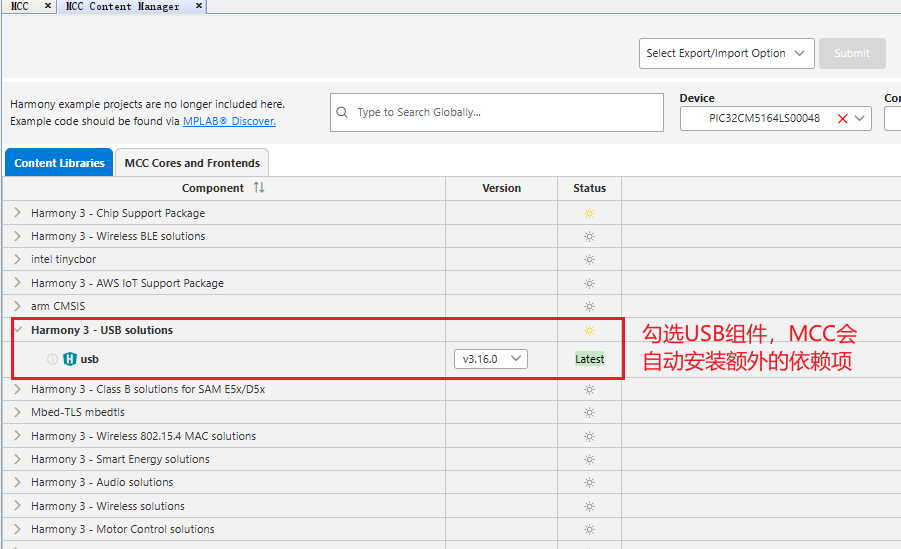
通过MCC中Content Manager安装需要使用的USB软件栈,相关的依赖项会由软件自动安装。
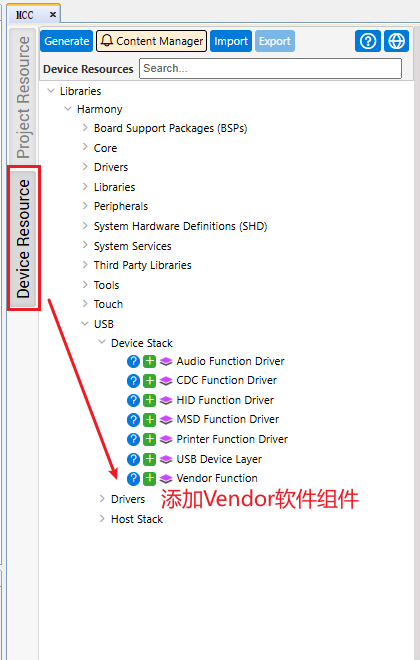
MCC的'Device Resource'选项卡中,添加'Vendor Function'组件。
'Project Resource'选项卡中,查看添加USB软件栈后的组件。
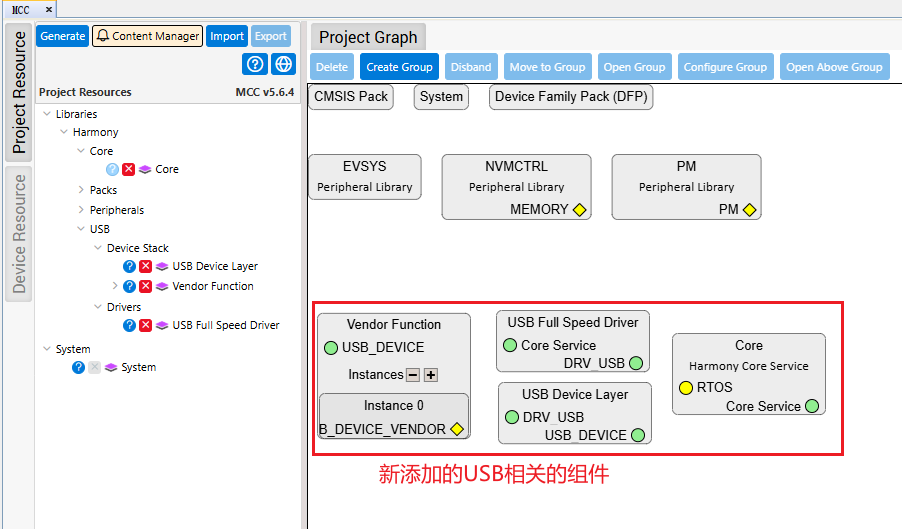
- Core (Harmony Core Service):用于支持程序调度以及应用程序管理;
- USB Full Speed Driver:USB通讯控制器外设的驱动程序;
- USB Device Layer:定义USB设备的描述符;
- Vendor Function:定义Vendor设备的End point数量;
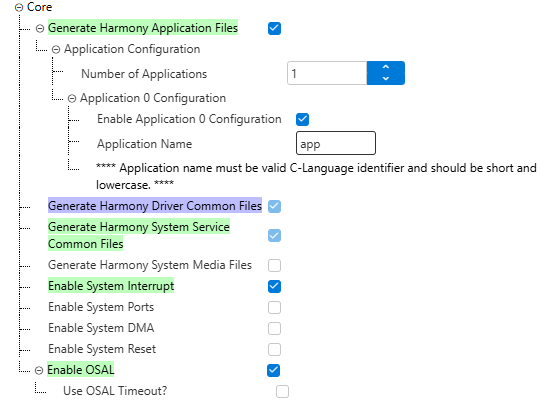
Core (Harmony Core Service)中勾选需要的组件,并设置应用层应用程序的数量。
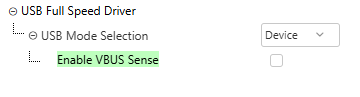
USB Full Speed Driver页面中选择USB的工作模式为Device,由于PIC32CM LS00 Curiosity Nano+ Touch Evaluation Kit硬件不支持VBus检测,取消VBus检测模块。
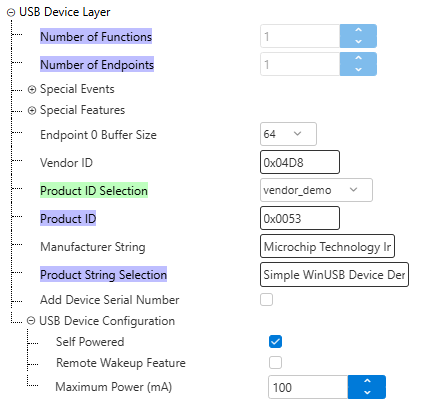
USB Device Layer页面中Production ID Selection选项卡选选择Vendor Demo,其余设置会同步更新。
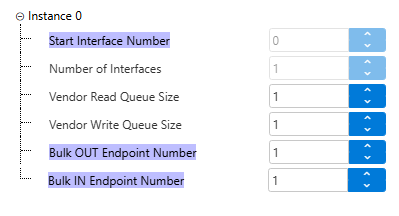
Vendor Function采用默认参数即可。
PIC32CM LS00 Curiosity Nano+ Touch Evaluation Kit创建的项目是默认开启TrustZone的,项目由No-Secure工程和Sercure工程构成,MCC生成的USB应用相关的代码会自动分配到No-Secure工程中。本文出于方便,不考虑程序的TrustZone相关的设置,应用程序主要运行在No-Secure环境中。
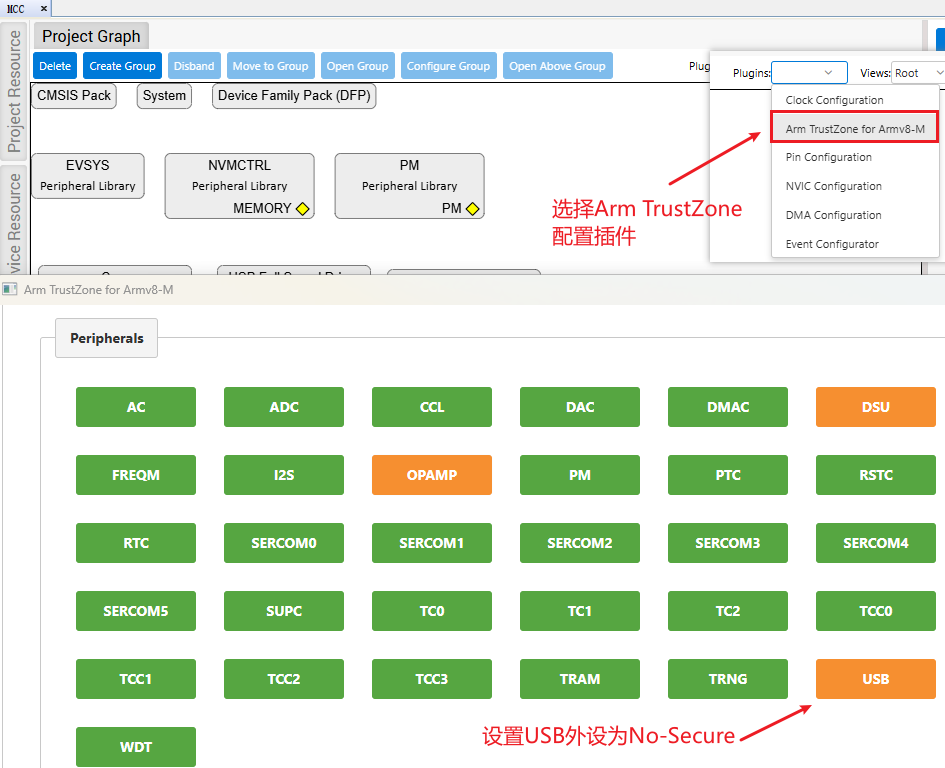
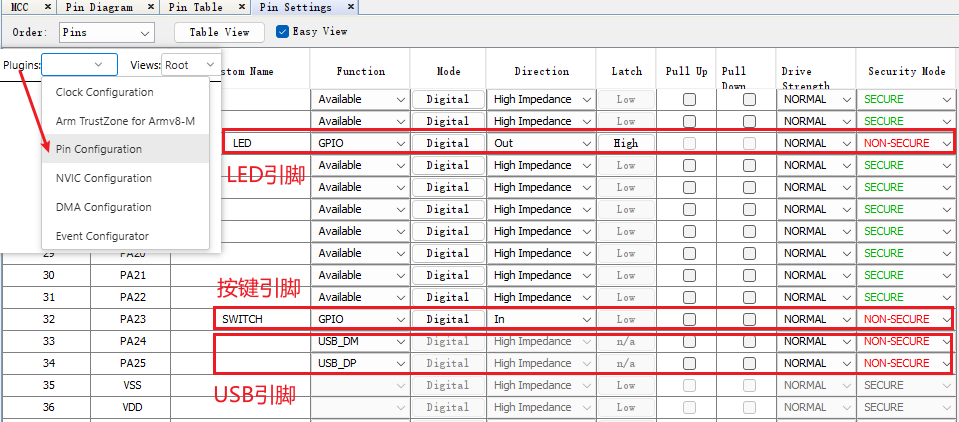
打开Pin Configuration插件,设置LED、按键和USB相关的引脚,并将其访问权限设置为No-Secure。
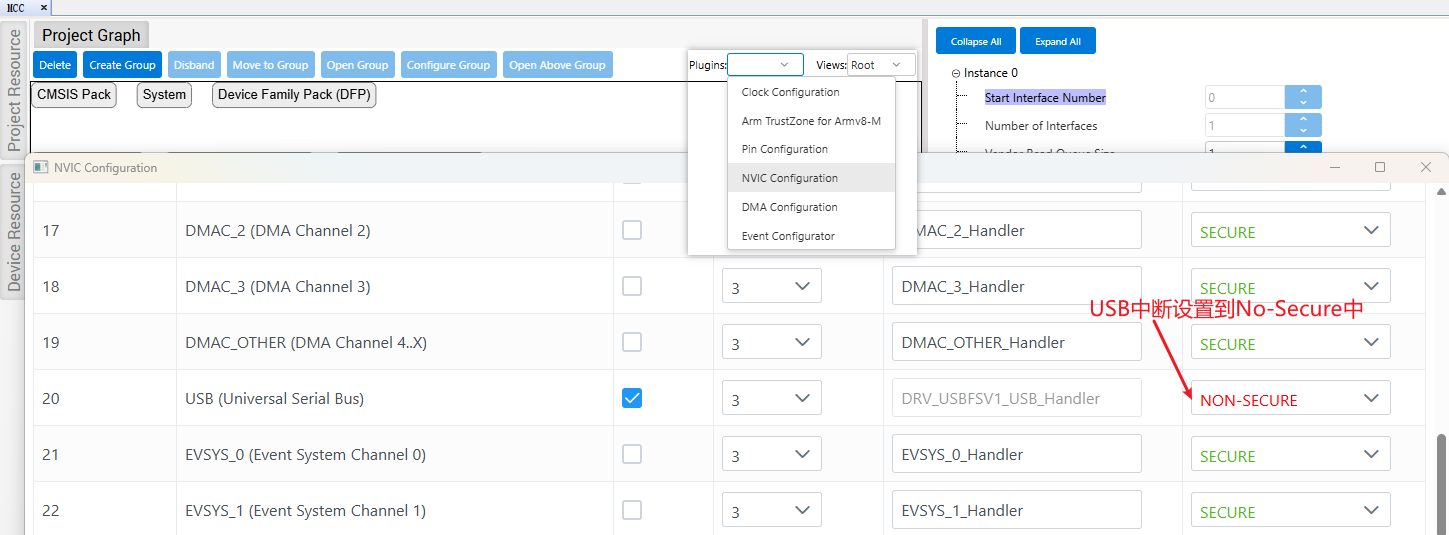
USB中断的安全访问权限同样设置为No-Secure
完成配置,使用MCC生成相应的代码。
2.2 应用程序
在工程中添加应用处理程序,对USB通讯的事件进行处理,并根据USB通讯得到的数据做出相应的处理,控制板载LED的亮灭,并发送按键IO的状态。
app.h中定义用于管理应用程序运行状态的状态机数据类型。
#define SWITCH_STATE_UNPRESSED 0
#define SWITCH_STATE_PRESSED 1
typedef enum
{
    /* Application's state machine's initial state. */
    APP_STATE_INIT=0,

    /* Application waits for device configuration */
    APP_STATE_WAIT_FOR_CONFIGURATION,

    /* Application runs the main task */
    APP_STATE_MAIN_TASK,

    /* Application error occurred */
    APP_STATE_ERROR

} APP_STATES;
定义用于管理USB通讯应用程序的结构体,结构体中包含USB设备句柄、应用程序状态机、USB设备回调函数等相关信息。
typedef struct
{
   /* Device layer handle returned by device layer open function */
    USB_DEVICE_HANDLE usbDevHandle;

    /* Application state*/
    APP_STATES state;

    /* Track device configuration */
    bool deviceIsConfigured;

    /* Configuration value */
    uint8_t configValue;

    /* speed */
    USB_SPEED speed;

    /* ep data sent */
    bool epDataWritePending;

    /* ep data received */
    bool epDataReadPending;

    /* Transfer handle */
    USB_DEVICE_TRANSFER_HANDLE writeTranferHandle;

    /* Transfer handle */
    USB_DEVICE_TRANSFER_HANDLE readTranferHandle;

    /* The transmit endpoint address */
    USB_ENDPOINT_ADDRESS endpointTx;

    /* The receive endpoint address */
    USB_ENDPOINT_ADDRESS endpointRx;

    /* Tracks the alternate setting */
    uint8_t altSetting;

    /* True is switch was pressed */
    bool isSwitchPressed;

    /* True if the switch press needs to be ignored*/
    bool ignoreSwitchPress;

    /* Flag determines SOF event occurrence */
    bool sofEventHasOccurred;

    /* Switch debounce timer */
    unsigned int switchDebounceTimer;

    /* Switch debounce timer count */
    unsigned int debounceCount;

    /* The endpoint size is 64 for FS and 512 for HS */
    uint16_t endpointMaxPktSize;

} APP_DATA;
应用初始化函数对应用程序结构进行初始化
void APP_Initialize ( void )
{
    /* Place the App state machine in its initial state. */
    appData.state = APP_STATE_INIT;
    appData.usbDevHandle = USB_DEVICE_HANDLE_INVALID;
    appData.deviceIsConfigured = false;
    appData.endpointRx = (APP_EP_BULK_OUT | USB_EP_DIRECTION_OUT);
    appData.endpointTx = (APP_EP_BULK_IN | USB_EP_DIRECTION_IN);
    appData.epDataReadPending = false;
    appData.epDataWritePending = false;
    appData.altSetting = 0;


    /* TODO: Initialize your application's state machine and other
     * parameters.
     */
}
定义USB设备事件处理函数,对USB相关的事件进行处理。
void APP_USBDeviceEventHandler(USB_DEVICE_EVENT event, void * eventData, uintptr_t context)
{
    uint8_t * configurationValue;
    USB_SETUP_PACKET * setupPacket;
    switch(event)
    {
        case USB_DEVICE_EVENT_RESET:
        case USB_DEVICE_EVENT_DECONFIGURED:

            /* Device is reset or deconfigured. Provide LED indication.*/
            LED_Clear();

            appData.deviceIsConfigured = false;

            break;

        case USB_DEVICE_EVENT_CONFIGURED:

            /* Check the configuration */
            configurationValue = (uint8_t *)eventData;
            if(*configurationValue == 1 )
            {
                /* The device is in configured state. Update LED indication */
                LED_Set();

                /* Reset endpoint data send & receive flag  */
                appData.deviceIsConfigured = true;
            }
            break;

        case USB_DEVICE_EVENT_SUSPENDED:

			LED_Clear();
            /* Device is suspended. */
            break;


        case USB_DEVICE_EVENT_POWER_DETECTED:

            /* VBUS is detected. Attach the device */
            USB_DEVICE_Attach(appData.usbDevHandle);
            break;

        case USB_DEVICE_EVENT_POWER_REMOVED:

            /* VBUS is removed. Detach the device */
            USB_DEVICE_Detach (appData.usbDevHandle);
            LED_Clear();
            break;

        case USB_DEVICE_EVENT_CONTROL_TRANSFER_SETUP_REQUEST:
            /* This means we have received a setup packet */
            setupPacket = (USB_SETUP_PACKET *)eventData;
            if(setupPacket->bRequest == USB_REQUEST_SET_INTERFACE)
            {
                /* If we have got the SET_INTERFACE request, we just acknowledge
                 for now. This demo has only one alternate setting which is already
                 active. */
                USB_DEVICE_ControlStatus(appData.usbDevHandle,USB_DEVICE_CONTROL_STATUS_OK);
            }
            else if(setupPacket->bRequest == USB_REQUEST_GET_INTERFACE)
            {
                /* We have only one alternate setting and this setting 0. So
                 * we send this information to the host. */

                USB_DEVICE_ControlSend(appData.usbDevHandle, &appData.altSetting, 1);
            }
            else
            {
                /* We have received a request that we cannot handle. Stall it*/
                USB_DEVICE_ControlStatus(appData.usbDevHandle, USB_DEVICE_CONTROL_STATUS_ERROR);
            }
            break;

        case USB_DEVICE_EVENT_ENDPOINT_READ_COMPLETE:
           /* Endpoint read is complete */
            appData.epDataReadPending = false;
            break;

        case USB_DEVICE_EVENT_ENDPOINT_WRITE_COMPLETE:
            /* Endpoint write is complete */
            appData.epDataWritePending = false;
            break;

        /* These events are not used in this demo. */
        case USB_DEVICE_EVENT_RESUMED:
            if(appData.deviceIsConfigured == true)
            {
                LED_Set();
            }
            break;
        case USB_DEVICE_EVENT_ERROR:
        default:
            break;
    }
}
应用任务中通过管理状态机,实现应用程序的状态机管理,完成USB设备开启、配置、数据收发以及外设监控功能。
void APP_Tasks (void )
{
    switch(appData.state)
    {
        case APP_STATE_INIT:
            /* Open the device layer */
            appData.usbDevHandle = USB_DEVICE_Open( USB_DEVICE_INDEX_0,
                    DRV_IO_INTENT_READWRITE );

            if(appData.usbDevHandle != USB_DEVICE_HANDLE_INVALID)
            {
                /* Register a callback with device layer to get event notification (for end point 0) */
                USB_DEVICE_EventHandlerSet(appData.usbDevHandle,  APP_USBDeviceEventHandler, 0);

                appData.state = APP_STATE_WAIT_FOR_CONFIGURATION;
            }
            else
            {
                /* The Device Layer is not ready to be opened. We should try
                 * again later. */
            }

            break;

        case APP_STATE_WAIT_FOR_CONFIGURATION:

            /* Check if the device is configured */
            if(appData.deviceIsConfigured == true)
            {
                if (USB_DEVICE_ActiveSpeedGet(appData.usbDevHandle) == USB_SPEED_FULL)
                {
                    appData.endpointMaxPktSize = 64;
                }
                else if (USB_DEVICE_ActiveSpeedGet(appData.usbDevHandle) == USB_SPEED_HIGH)
                {
                    appData.endpointMaxPktSize = 512;
                }
                if (USB_DEVICE_EndpointIsEnabled(appData.usbDevHandle, appData.endpointRx) == false )
                {
                    /* Enable Read Endpoint */
                    USB_DEVICE_EndpointEnable(appData.usbDevHandle, 0, appData.endpointRx,
                            USB_TRANSFER_TYPE_BULK, appData.endpointMaxPktSize);
                }
                if (USB_DEVICE_EndpointIsEnabled(appData.usbDevHandle, appData.endpointTx) == false )
                {
                    /* Enable Write Endpoint */
                    USB_DEVICE_EndpointEnable(appData.usbDevHandle, 0, appData.endpointTx,
                            USB_TRANSFER_TYPE_BULK, appData.endpointMaxPktSize);
                }
                /* Indicate that we are waiting for read */
                appData.epDataReadPending = true;

                /* Place a new read request. */
                USB_DEVICE_EndpointRead(appData.usbDevHandle, &appData.readTranferHandle,
                        appData.endpointRx, &receivedDataBuffer[0], sizeof(receivedDataBuffer) );

                /* Device is ready to run the main task */
                appData.state = APP_STATE_MAIN_TASK;
            }
            if(SWITCH_Get() == SWITCH_STATE_PRESSED)
            {
                USB_DEVICE_Attach(appData.usbDevHandle);
            }
            break;

        case APP_STATE_MAIN_TASK:

            if(!appData.deviceIsConfigured)
            {
                /* This means the device got deconfigured. Change the
                 * application state back to waiting for configuration. */
                appData.state = APP_STATE_WAIT_FOR_CONFIGURATION;

                /* Disable the endpoint*/
                USB_DEVICE_EndpointDisable(appData.usbDevHandle, appData.endpointRx);
                USB_DEVICE_EndpointDisable(appData.usbDevHandle, appData.endpointTx);
                appData.epDataReadPending = false;
                appData.epDataWritePending = false;
            }
            else if (appData.epDataReadPending == false)
            {
                /* Look at the data the host sent, to see what kind of
                 * application specific command it sent. */

                switch(receivedDataBuffer[0])
                {
                    case 0x80:

                        /* This is the toggle LED command */
                        LED_Toggle();
                        break;

                    case 0x81:

                        /* This is a switch check command. Check if the TX is free
                         * for us to send a status. */

                        if(appData.epDataWritePending == false)
                        {
                            /* Echo back to the host PC the command we are fulfilling
                             * in the first byte.  In this case, the Get Pushbutton
                             * State command. */

                            transmitDataBuffer[0] = 0x81;

                            if(SWITCH_Get() == SWITCH_STATE_PRESSED)
                            {
                                transmitDataBuffer[1] = 0x00;
                            }
                            else
                            {
                                transmitDataBuffer[1] = 0x01;
                            }

                            /* Send the data to the host */

                            appData.epDataWritePending = true;

                            USB_DEVICE_EndpointWrite ( appData.usbDevHandle, &appData.writeTranferHandle,
                                    appData.endpointTx, &transmitDataBuffer[0],
                                    sizeof(transmitDataBuffer),
                                    USB_DEVICE_TRANSFER_FLAGS_MORE_DATA_PENDING);
                        }
                        break;
                    default:
                        break;
                }

                appData.epDataReadPending = true ;

                /* Place a new read request. */
                USB_DEVICE_EndpointRead ( appData.usbDevHandle, &appData.readTranferHandle,
                        appData.endpointRx, &receivedDataBuffer[0], sizeof(receivedDataBuffer) );
            }
            break;

        case APP_STATE_ERROR:
            break;

        default:
            break;
    }
}
应用程序状态机的转换如下所示:
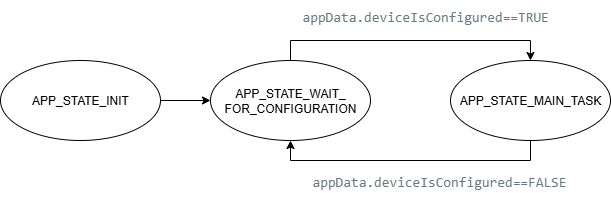
APP_STATE_INIT状态机中,打开USB设备并切换状态机到APP_STATE_WAIT_FOR_CONFIGURATION,等待USB设备配置完成。USB设备在接入到HOST主机,检测USB设备配置完成,使能USB EndPoint的读写,并切换到APP_STATE_MAIN_TASK;调用USB的读写函数,根据接收到的数据控制LED的状态翻转,并读取按键IO的状态,发送按键的状态信息。
3、上位机程序和功能演示
以上示例基于Microchip提供的usb_apps_device仓库中的代码参考实现,代码仓库apps\vendor\bin中提供用于通讯的USB上位机。
https://github.com/Microchip-MPLAB-Harmony/usb_apps_device.git
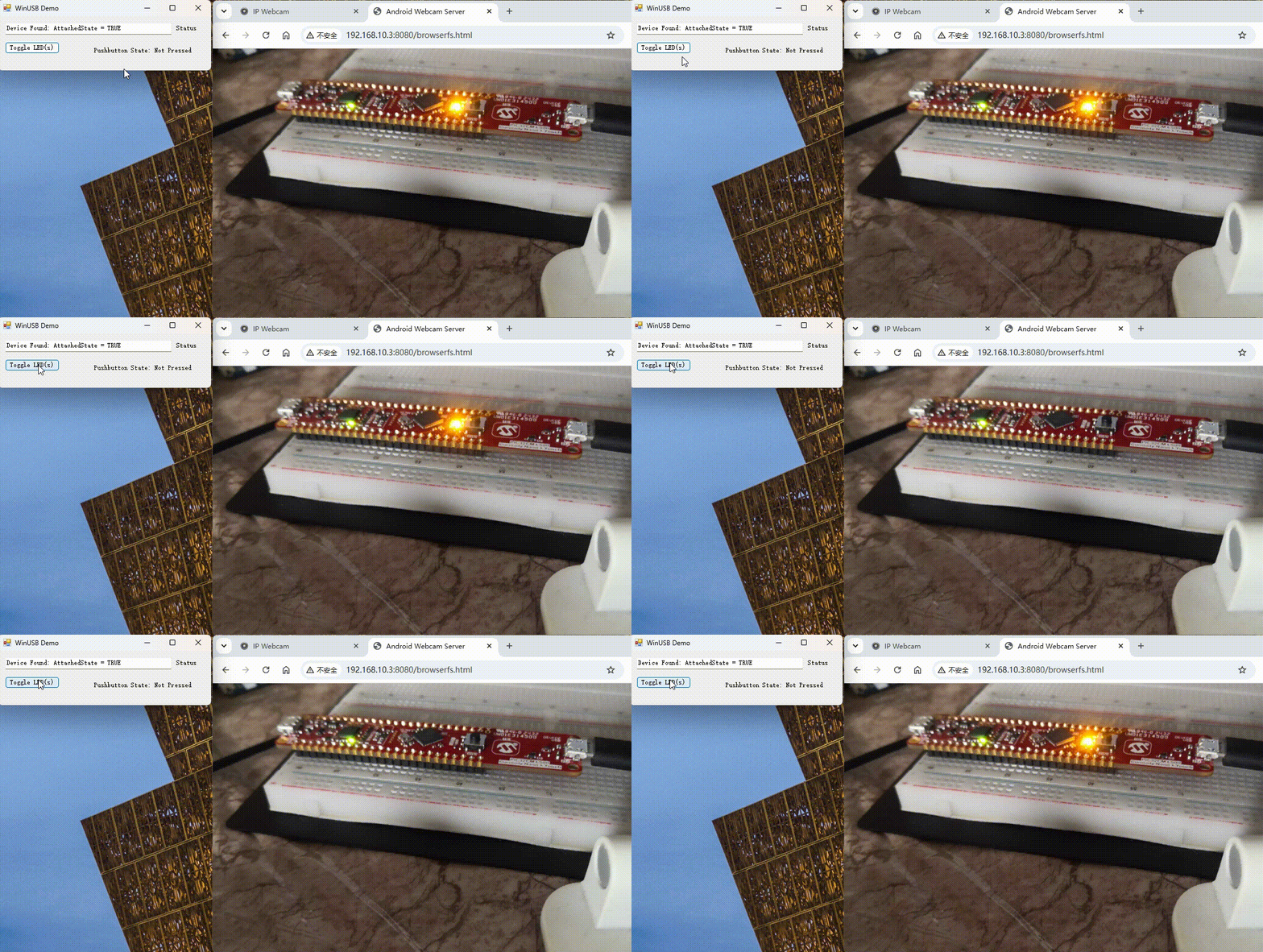
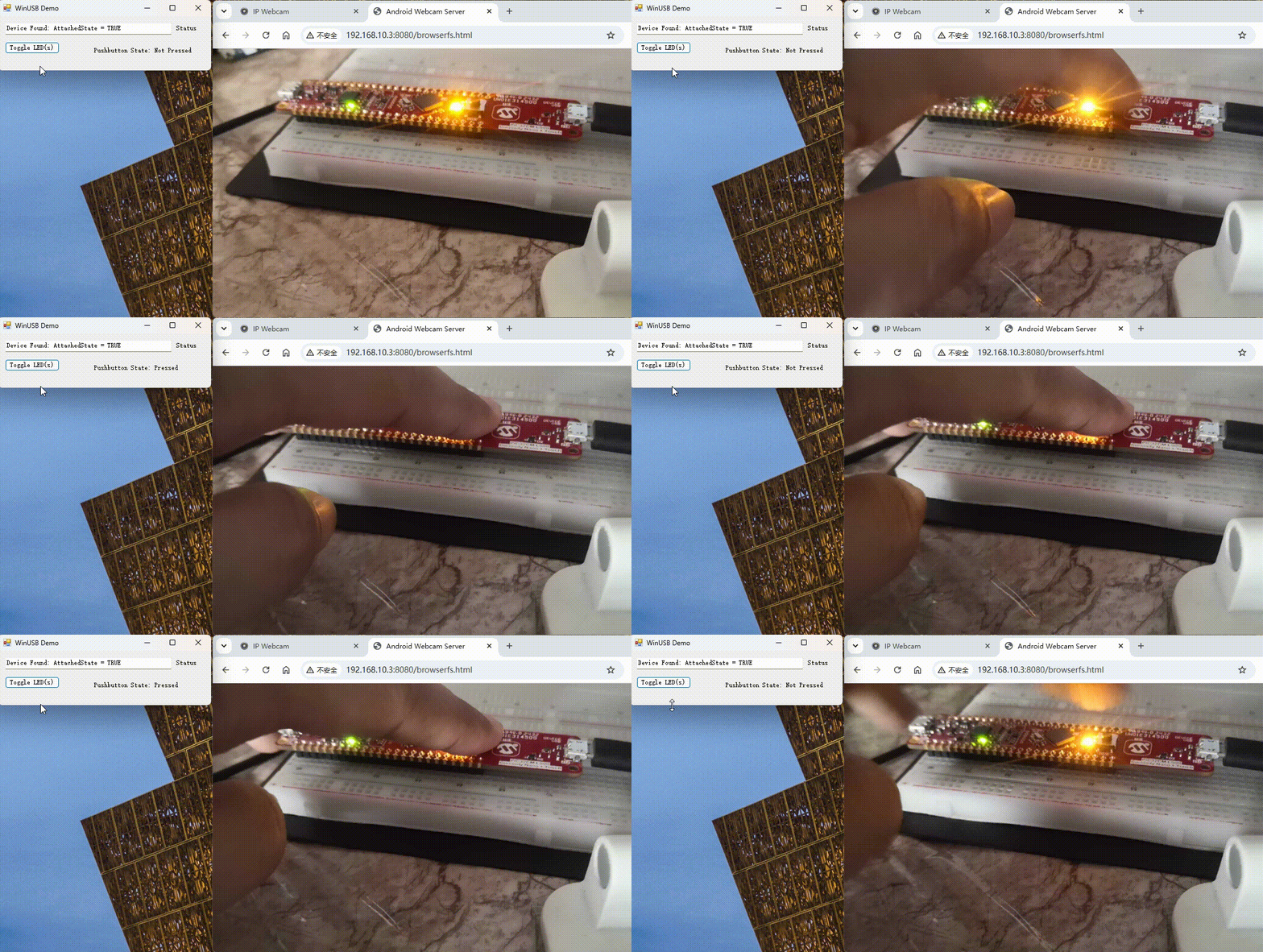
开发板的USB Device接口连接到PC,运行WinUSB_PnP_Demo上位机,使用上位机控制板载LED的翻转以及按键状态的监控。
上位机的源码可以在Github上找到
https://github.com/mentatpsi/Microchip.git
连接开发板到上位机,上位机程序的运行效果如图所示。
LED翻转:
按键IO监测:
4、总结
利用Microchip提供的开发示例和工具源码可以快速上手开发嵌入式USB应用,是十分不错的学习资料。

 子午鼠FuShenxiao
 BOBOEMS