
基于max32650实现智能植物监护器
所选任务:赛道5创新应用的智能植物监护器
任务内容:采集土壤湿度、环境温湿度及光照等数据,实时显示植物生长环境,并根据设定阈值进行缺水提醒,可扩展自动浇水控制功能。
项目描述
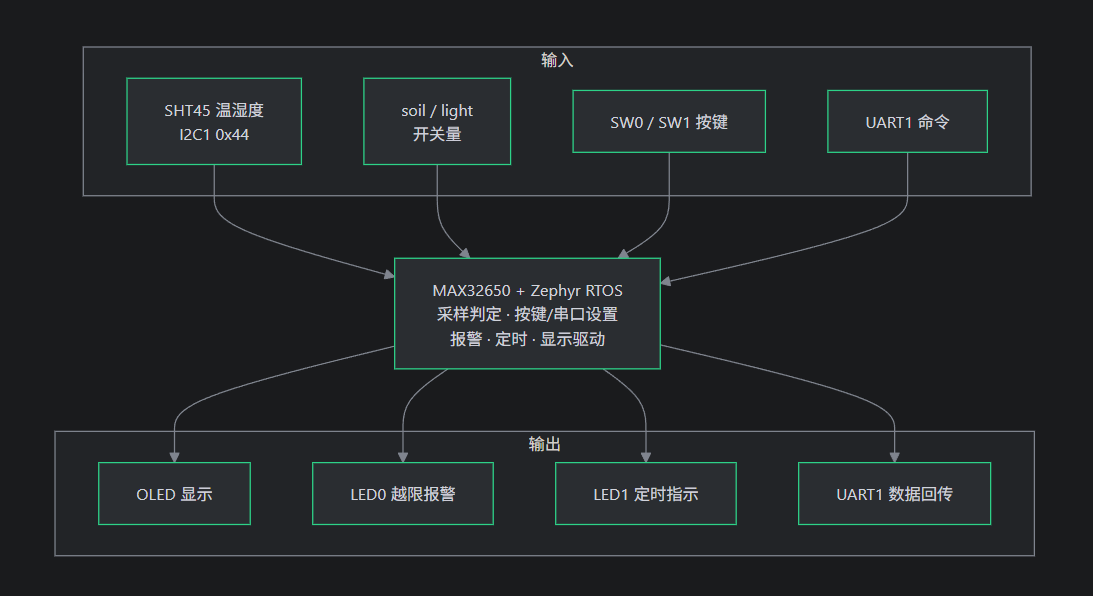
本项目是一个基于 MAX32650 + Zephyr RTOS的智能植物监护器:以 SHT45 采集植物所处环境的温湿度,同时读取土壤与光照两路开关量,在 OLED 上显示对应的温湿度,光照,土壤湿度数据,并提供按键本地设置、蓝牙远程设置、越限报警与定时浇水,用于植物生长环境的实时监护与异常提示。
开发环境
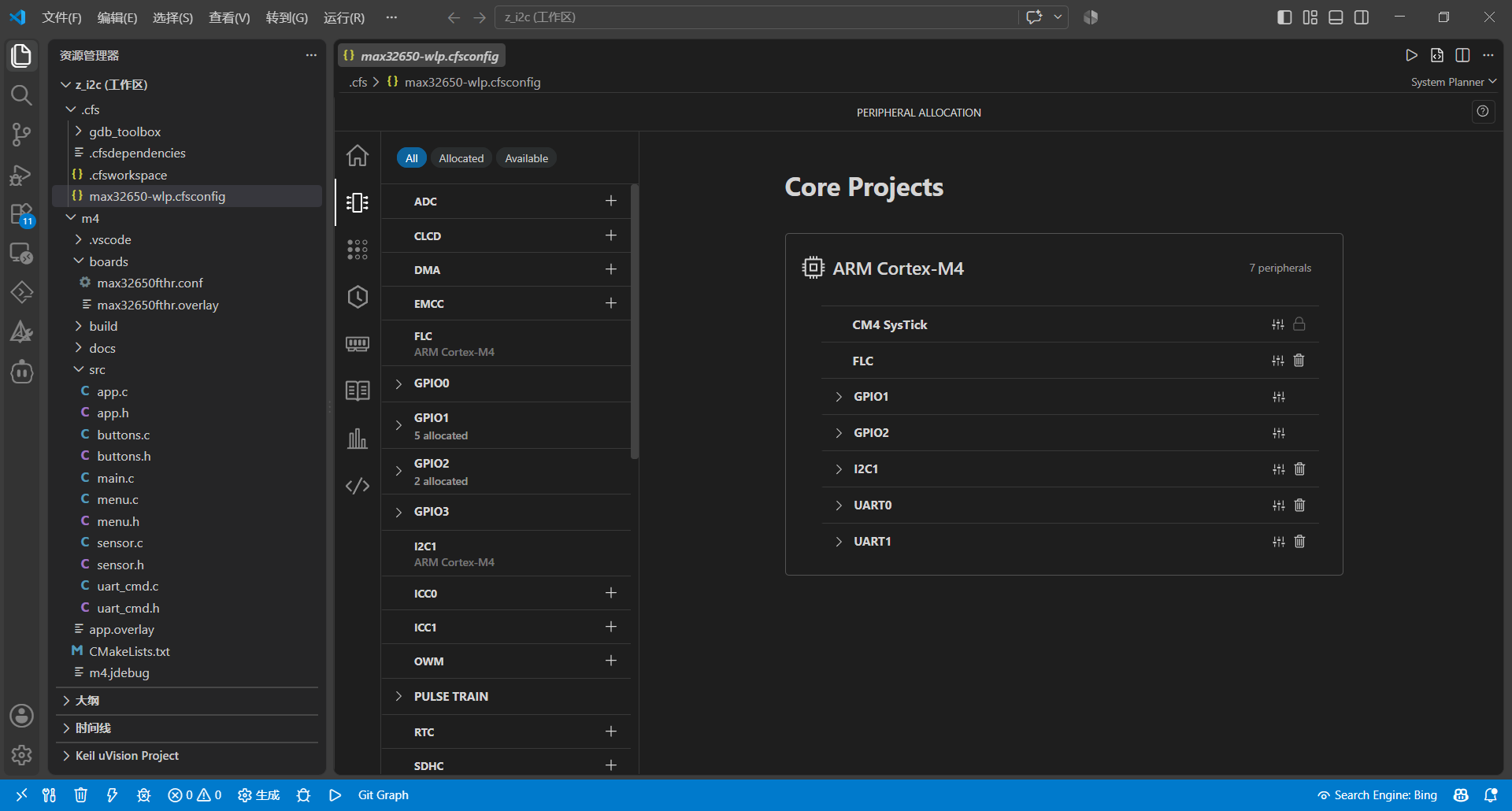
采用vscode+CodeFusion Studio插件进行开发
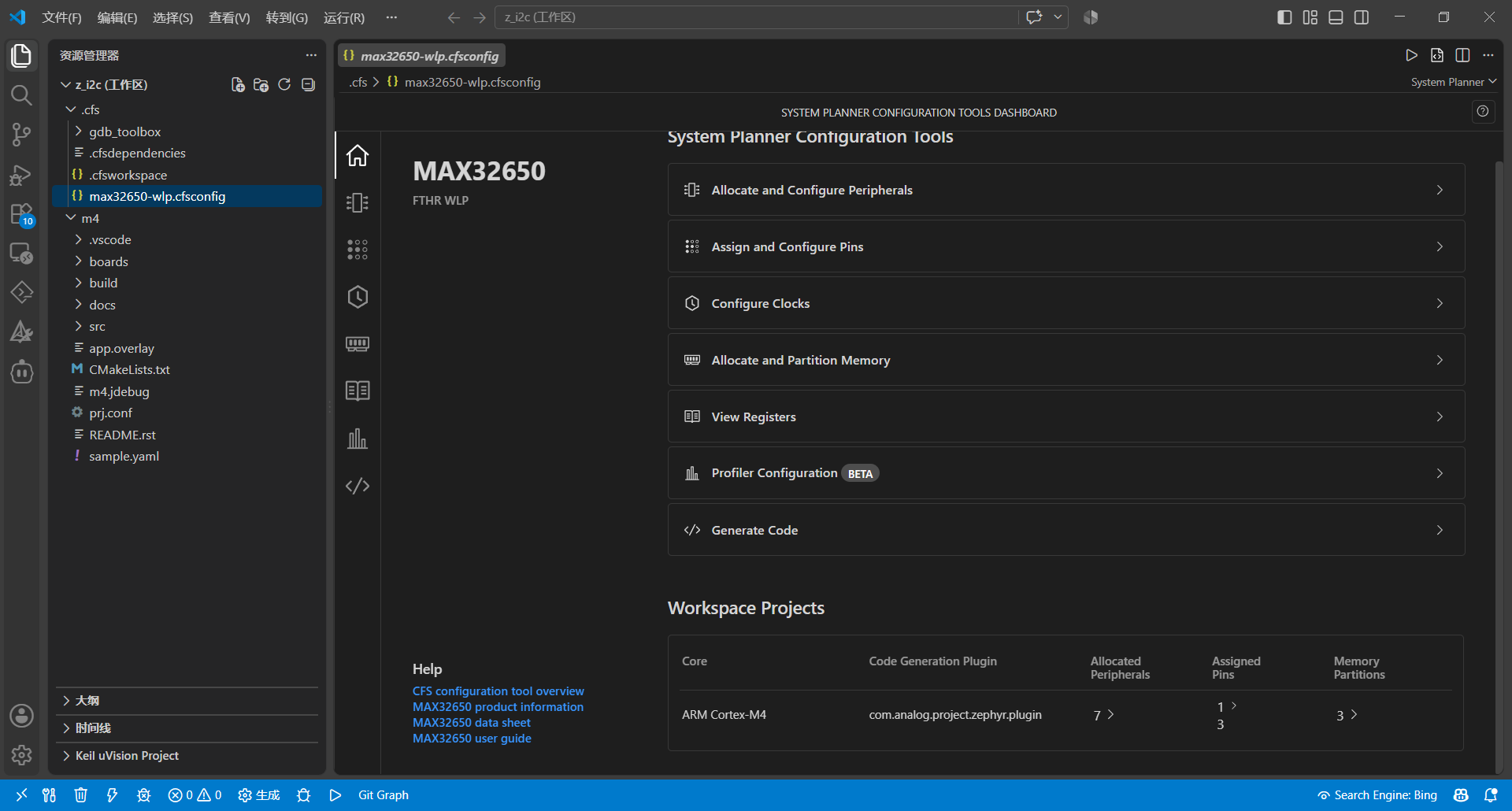
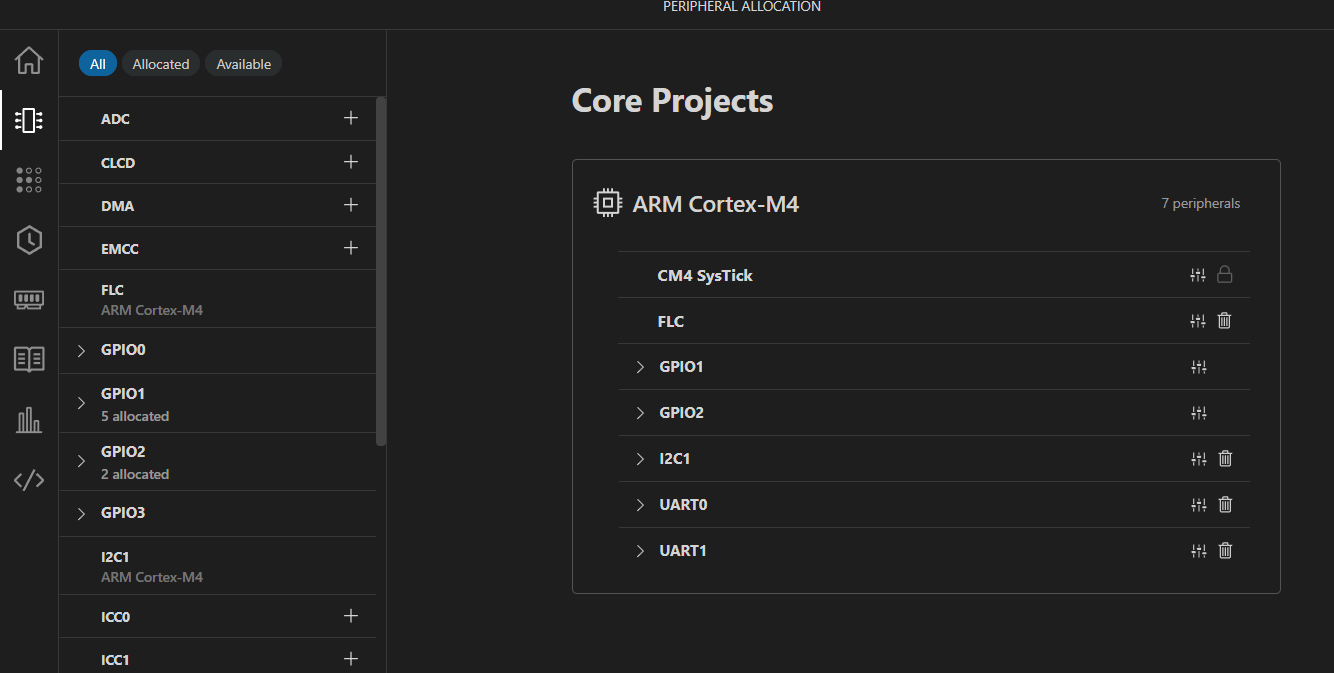
下图是所用到的外设
硬件
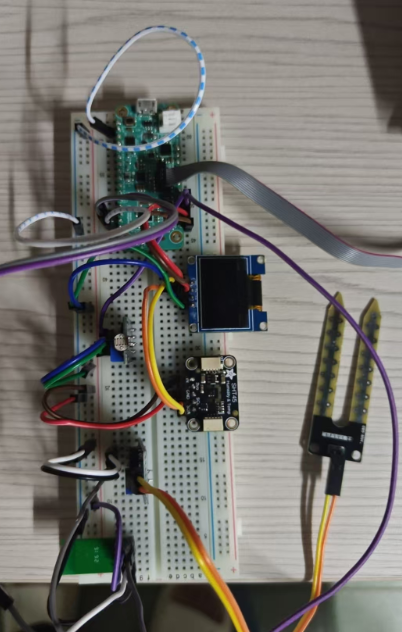
硬件采用了max32650,0.96oled,sht45,光敏模块,土壤湿度传感器,mx-01ps蓝牙模块,面包板,杜邦线若干
接线关系
P2_17 、P2_18 ---------- OLED SHT45
P2_14 、P2_16 ----------- 蓝牙模块
P2_13 ------------- 土壤湿度模块
P2_15 -------------- 光敏模块
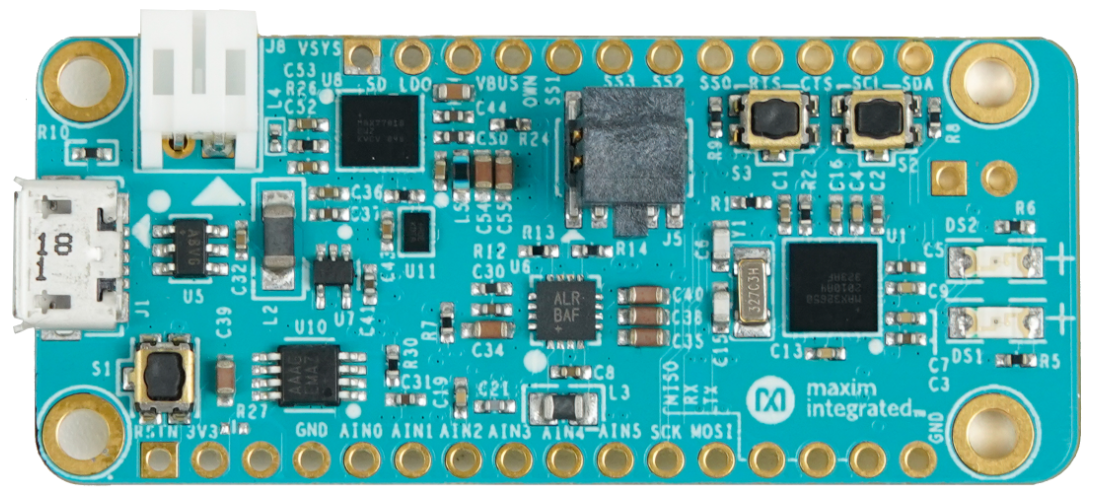
max32650
超低功耗Arm Cortex-M4 FPU微控制器,用于电池供电应用;DARWIN系列UP微控制器让小容量电池支持大型应用。MAX32650—MAX32652为超低功耗、存储器可扩展微控制器,专门设计用于高性能、电池供电应用。
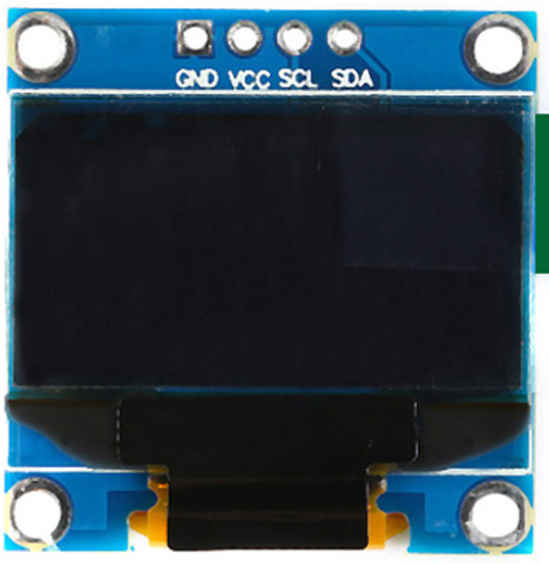
0.96oled
0.96寸OLED显示屏是嵌入式开发和电子制作中非常经典的一款小尺寸、自发光、高对比度的显示模块。它以极低的功耗和简单的接线方式,成为Arduino、STM32、ESP32等单片机项目显示信息的首选。
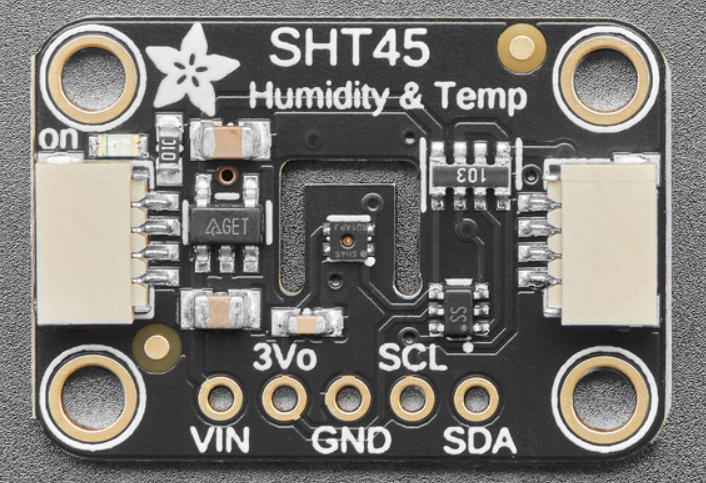
sht45
SHT45 传感器属于第四代产品。在 20%到 70%的相对湿度范围内,SHT45 的精度高达±1.0%;在 5°C 到 60°C 的温度范围内,其精度则可达到±0.1°C。
实际硬件图
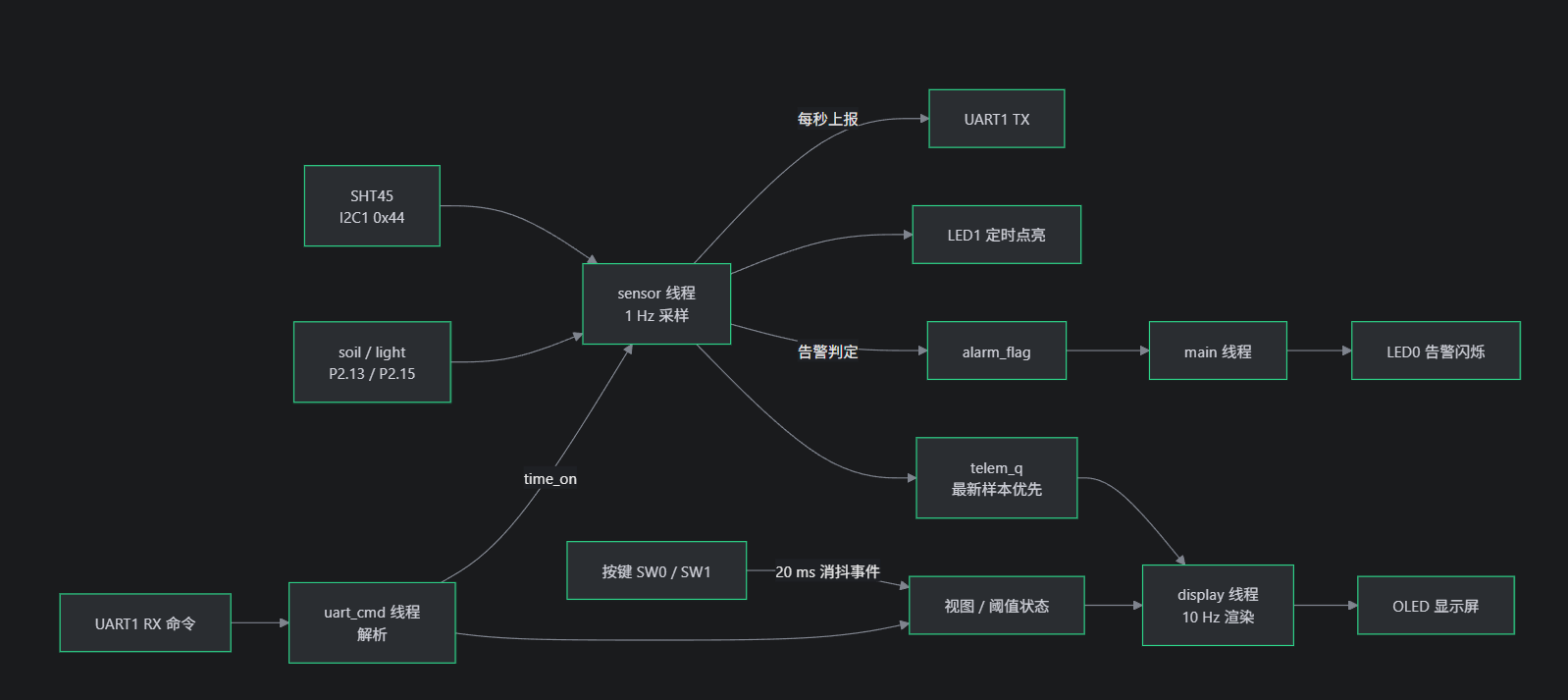
系统框图
设计思路
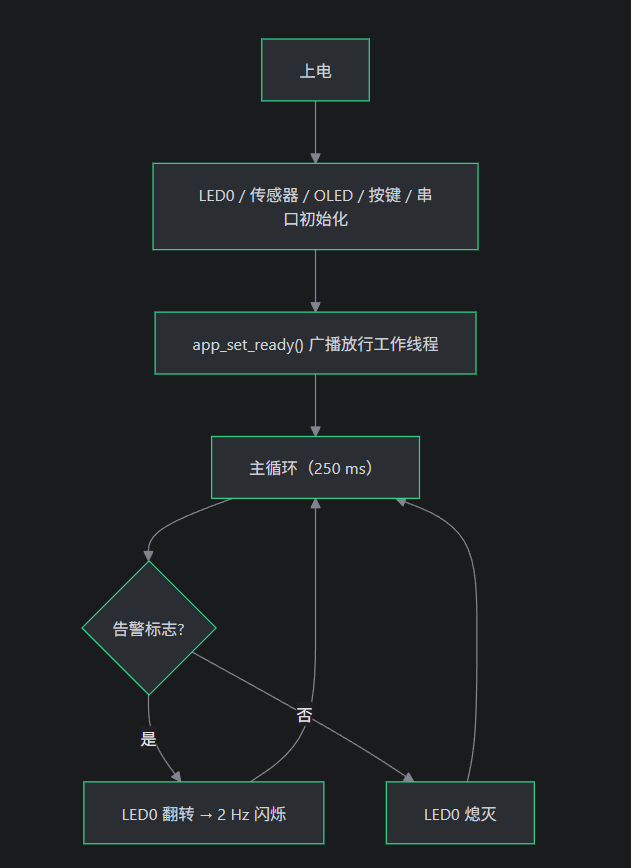
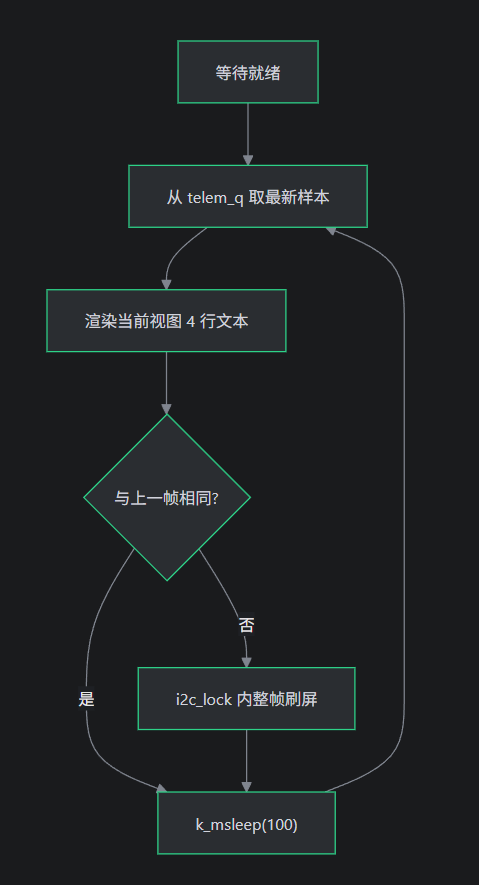
系统设计遵循"中断轻量化、线程解耦、总线串行化"原则:中断上下文仅做字节搬运与中断线开关,采样、解析、渲染等耗时逻辑全部下沉至独立线程;采集与显示经"最新样本优先"消息队列异步衔接,显示仅在文本变化时整帧刷屏以节省 I2C 带宽;初始化采用事件广播避免线程饿死,按键以"边沿中断—关闭中断—延时复检"实现规范化消抖,并辅以读取重试、栈分析与崩溃转储保障系统健壮性与可观测性。
下面是线程与优先级
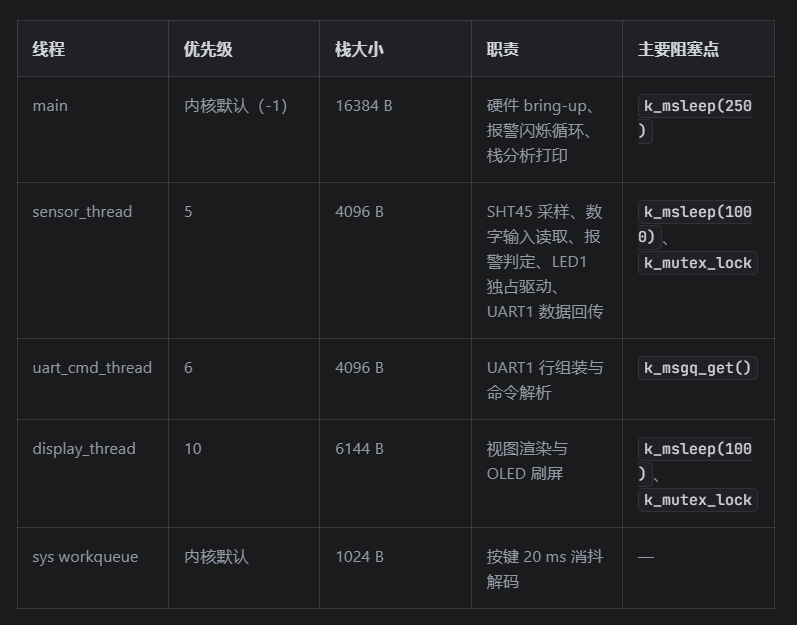
软件流程图
系统总流程图
main.c — 启动与主循环
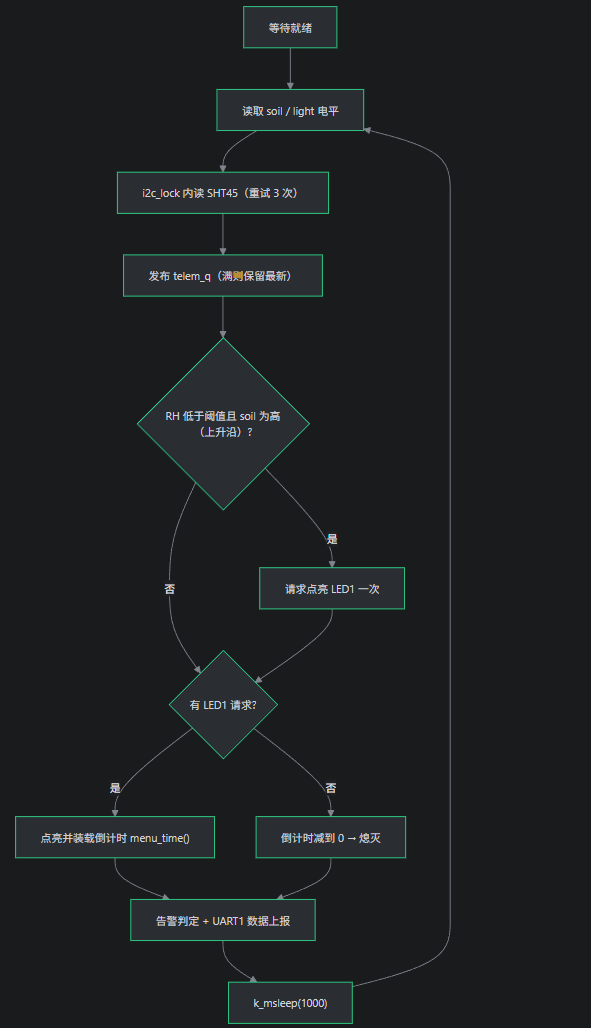
采样线程
显示线程
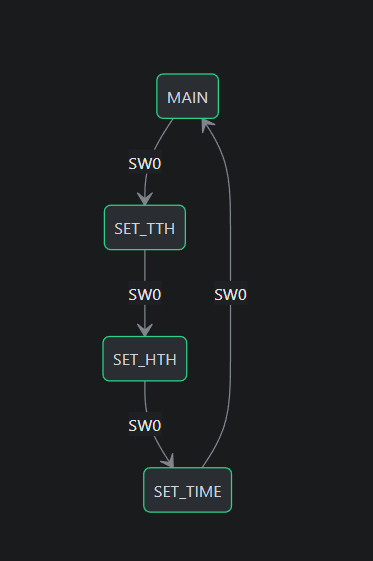
界面切换流程
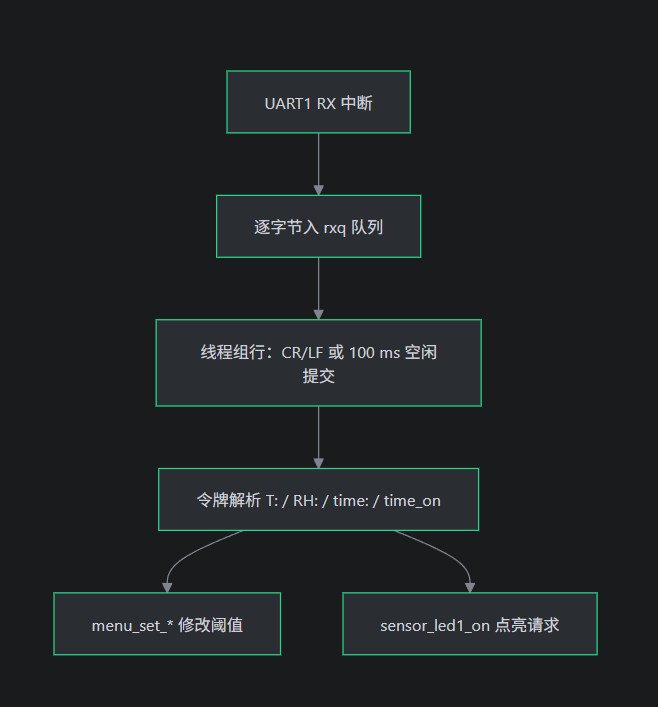
命令接收与解析
代码
按键代码:
按键驱动模块(buttons.c)负责 SW0(P1.19)与 SW1(P1.21)的消抖与事件分发:按键中断仅关闭该引脚中断并调度 20 ms 延迟工作,消抖工作重新读取引脚电平,确认按下后分别触发"切换视图"与"阈值加一"事件,随后恢复双边沿中断。该"中断触发—延迟消抖—电平确认"机制可有效避免抖动误触发,使中断上下文保持极短,并通过统一的结构体与容器宏实现双按键的规范化驱动。
static void button_decode(struct k_work *w)
{
    struct k_work_delayable *dw = k_work_delayable_from_work(w);
    struct button *b = CONTAINER_OF(dw, struct button, dwork);


    if (gpio_pin_get_dt(&b->spec) == 1) {
        menu_event(b->ev);
    }


    gpio_pin_interrupt_configure_dt(&b->spec, GPIO_INT_EDGE_BOTH);
}


static void button_isr(const struct device *dev, struct gpio_callback *cb,
               uint32_t pins)
{
    struct button *b = CONTAINER_OF(cb, struct button, cb);


    ARG_UNUSED(dev);
    ARG_UNUSED(pins);


    /* mute the line until the debounced decode re-reads the level */
    gpio_pin_interrupt_configure_dt(&b->spec, GPIO_INT_DISABLE);
    k_work_schedule(&b->dwork, K_MSEC(BTN_DEBOUNCE_MS));
}


static int button_init(struct button *b)
{
    int ret;


    if (!gpio_is_ready_dt(&b->spec)) {
        return -ENODEV;
    }
    ret = gpio_pin_configure_dt(&b->spec, GPIO_INPUT);
    if (ret < 0) {
        return ret;
    }
    k_work_init_delayable(&b->dwork, button_decode);
    gpio_init_callback(&b->cb, button_isr, BIT(b->spec.pin));
    ret = gpio_add_callback_dt(&b->spec, &b->cb);
    if (ret < 0) {
        return ret;
    }
    return gpio_pin_interrupt_configure_dt(&b->spec, GPIO_INT_EDGE_BOTH);
}


static struct button btn_sw0 = {
    .spec = GPIO_DT_SPEC_GET(SW0_NODE, gpios),
    .ev = UI_EV_SW0_SHORT,
};


static struct button btn_sw1 = {
    .spec = GPIO_DT_SPEC_GET(SW1_NODE, gpios),
    .ev = UI_EV_SW1_SHORT,
};
界面代码 :
OLED 菜单模块(menu.c)实现视图状态机、阈值管理与 10 Hz 显示线程:SW0 循环切换主界面(实时温湿度与光照/土壤数字电平)、温度阈值、湿度阈值与 LED1 点亮时间四个视图,SW1 对当前设置视图的数值加一(钳位 0~99 / 1~99);显示线程从传感器消息队列中仅取最新样本渲染,并仅在文本内容变化时才刷新屏幕,未变化帧不产生任何 I2C 开销,配合互斥锁保障视图、阈值与总线访问的并发安全,兼顾显示实时性与总线效率。
void menu_event(enum ui_event ev)
{
    k_mutex_lock(&ui_lock, K_FOREVER);


    switch (ev) {
    case UI_EV_SW0_SHORT:
        switch (cur_view) {
        case VIEW_MAIN:
            cur_view = VIEW_SET_TTH;
            printf("UI: set temp view\n");
            break;
        case VIEW_SET_TTH:
            cur_view = VIEW_SET_HTH;
            printf("UI: set hum view\n");
            break;
        case VIEW_SET_HTH:
            cur_view = VIEW_SET_TIME;
            printf("UI: set time view\n");
            break;
        case VIEW_SET_TIME:
            cur_view = VIEW_MAIN;
            printf("UI: main view\n");
            break;
        }
        break;


    case UI_EV_SW1_SHORT:
        /* Increment the value shown by the current view only; same
         * clamps as menu_set_*(): 0..99 degC / %RH, 1..99 s */
        switch (cur_view) {
        case VIEW_MAIN:
            break;
        case VIEW_SET_TTH:
            if (t_th < 99) {
                t_th++;
            }
            printf("UI: T threshold -> %d C\n", t_th);
            break;
        case VIEW_SET_HTH:
            if (h_th < 99) {
                h_th++;
            }
            printf("UI: H threshold -> %d %%\n", h_th);
            break;
        case VIEW_SET_TIME:
            if (t_time < 99) {
                t_time++;
            }
            printf("UI: LED1 on-time -> %d s\n", t_time);
            break;
        }
        break;
    }


    k_mutex_unlock(&ui_lock);
}

static void render_view(char lines[4][24])
{
    switch (cur_view) {
    case VIEW_MAIN: {
        const struct telem *s = &last_telem;


        if (s->valid) {
            uint32_t ta = (s->t_centi < 0)
                          ? -(uint32_t)s->t_centi
                          : (uint32_t)s->t_centi;
            uint32_t ra = (s->rh_centi < 0)
                          ? 0U : (uint32_t)s->rh_centi;


            snprintf(lines[0], 24, "T: %s%u.%02u C",
                 (s->t_centi < 0) ? "-" : "",
                 ta / 100U, ta % 100U);
            snprintf(lines[1], 24, "RH: %u.%02u %%",
                 ra / 100U, ra % 100U);
        } else {
            strcpy(lines[0], "T: --.-- C");
            strcpy(lines[1], "RH: --.-- %");
        }
        /* Digital level spec: pin low -> "hight", pin high -> "low" */
        strcpy(lines[2], s->light_lvl ? "L:low" : "L:hight");
        strcpy(lines[3], s->soil_lvl ? "S:low" : "S:hight");
        break;
    }


    case VIEW_SET_TTH:
        strcpy(lines[0], "Set Temp Th");
        snprintf(lines[1], 24, "Th: %d C", t_th);
        lines[2][0] = '\0';
        strcpy(lines[3], "SW0:Next");
        break;


    case VIEW_SET_HTH:
        strcpy(lines[0], "Set Hum Th");
        snprintf(lines[1], 24, "Th: %d %%", h_th);
        lines[2][0] = '\0';
        strcpy(lines[3], "SW0:Next");
        break;


    case VIEW_SET_TIME:
        strcpy(lines[0], "Set Time");
        snprintf(lines[1], 24, "Time: %d s", t_time);
        lines[2][0] = '\0';
        strcpy(lines[3], "SW0:Done");
        break;
    }
}
串口蓝牙代码:
UART1 命令行控制模块实现串口在线调参,无需重新烧录即可修改告警阈值与 LED 点亮时间。模块采用"中断—消息队列—解析线程"三级架构,将耗时解析移出中断上下文;支持`T:xx` 、`RH:xx` 设置温湿度阈值,`time:xx` 设置水泵开启时间(用led1点亮代替),`time_on` 立即开启水泵(点亮 LED1),并具备空闲超时断帧、参数钳位与互斥保护机制。该模块仅占用 UART1 接收通道,与传感器线程的数据上报互不干扰,兼具实时性与健壮性。
static void process_line(const char *s)
{
    const char *p;
    bool any = false;
    int v;


    p = strstr(s, "time_on");
    if (p == NULL) {
        p = strstr(s, "TIME_ON");
    }
    if (p != NULL) {
        printf("UART1 cmd: time_on token -> LED1 on\n");
        sensor_led1_on();
        any = true;
    }


    p = strstr(s, "time:");
    if (p == NULL) {
        p = strstr(s, "TIME:");
    }
    if (p != NULL) {
        v = atoi(p + 5);
        printf("UART1 cmd: time token -> %d s\n", v);
        menu_set_time(v);
        any = true;
    }


    p = strstr(s, "RH:");
    if (p != NULL) {
        v = atoi(p + 3);
        printf("UART1 cmd: RH token -> %d %%\n", v);
        menu_set_hth(v);
        any = true;
    }


    p = strstr(s, "T:");
    if (p != NULL) {
        v = atoi(p + 2);
        printf("UART1 cmd: T token -> %d C\n", v);
        menu_set_tth(v);
        any = true;
    }


    if (!any) {
        printf("UART1 cmd: no time_on/time:/T:/RH: token in line\n");
    }
}
传感器代码:
传感器采样线程(sensor.c)以 1 Hz 周期经互斥保护的 I2C1 总线读取 SHT45 温湿度数据,内置瞬态错误重试与定点数转换机制,并将结果发布至遥测消息队列、经 UART1 上报,同时完成超阈值告警评估;线程还负责采样土壤/光照数字输入(P2.13/P2.15),并作为 LED1(P1.18,低电平点亮)的唯一驱动者,在响应`time_on` 命令点亮后按设定时间自动熄灭,且当湿度低于阈值、土壤为高时自动触发一次照明脉冲,实现了数据采集、上报、告警与执行器控制的统一调度。
static void sensor_thread(void *p1, void *p2, void *p3)
{
    ARG_UNUSED(p1);
    ARG_UNUSED(p2);
    ARG_UNUSED(p3);


    uint32_t led1_sec = 0;  /* remaining LED1 on-time, 0 = off */
    bool auto_trig_prev = false;    /* last auto-trigger condition state */


    app_wait_ready();


    while (1) {
        int32_t t_centi = 0, rh_centi = 0;
        int ret;


        /* Digital inputs: raw physical levels (low = 0, high = 1) */
        int light_lvl = gpio_pin_get_raw(light_in.port, light_in.pin);
        int soil_lvl = gpio_pin_get_raw(soil_in.port, soil_in.pin);


        /* I2C bus transaction group, protected by the bus mutex */
        k_mutex_lock(&i2c_lock, K_FOREVER);
        ret = sht45_read(&t_centi, &rh_centi);
        k_mutex_unlock(&i2c_lock);


        struct telem t = {
            .valid = (ret == 0),
            .t_centi = t_centi,
            .rh_centi = rh_centi,
            .light_lvl = (light_lvl > 0),
            .soil_lvl = (soil_lvl > 0),
            .err = ret,
        };


        if (k_msgq_put(&telem_q, &t, K_NO_WAIT) != 0) {
            k_msgq_purge(&telem_q);
            k_msgq_put(&telem_q, &t, K_NO_WAIT);
        }


        /* Auto-trigger: when the humidity drops below its threshold while
         * soil reads high, fire ONE LED1 pulse (rising edge only, so a
         * lasting condition does not keep re-arming the timer). */
        if (ret == 0) {
            bool cond = (rh_centi < (int32_t)menu_hth() * 100) &&
                    (soil_lvl > 0);


            if (cond && !auto_trig_prev) {
                printf("LED1 auto-trigger: RH below %d %%, soil high\n",
                       menu_hth());
                atomic_set(&led1_req, 1L);
            }
            auto_trig_prev = cond;
        }


        /* One-shot LED1 (exclusive owner of the pin): a "time_on"
         * request lights it (physical low) and (re)loads the on-time;
         * the 1 Hz loop tick then counts it down and turns it off
         * (physical high). */
        if (atomic_cas(&led1_req, 1L, 0L)) {
            led1_sec = (uint32_t)menu_time();
            gpio_pin_set_raw(led1_out.port, led1_out.pin, 0);
            printf("LED1 ON for %u s\n", led1_sec);
        } else if (led1_sec > 0 && --led1_sec == 0) {
            gpio_pin_set_raw(led1_out.port, led1_out.pin, 1);
            printf("LED1 OFF\n");
        }


        if (ret == 0) {
            uint32_t ta = (t_centi < 0) ? -(uint32_t)t_centi
                            : (uint32_t)t_centi;
            uint32_t ra = (rh_centi < 0) ? 0U : (uint32_t)rh_centi;
            char uline[48];


            app_alarm_set(t_centi > (int32_t)menu_tth() * 100 ||
                      rh_centi > (int32_t)menu_hth() * 100);


            printf("Temp: %s%u.%02u C, RH: %u.%02u %%\n",
                   (t_centi < 0) ? "-" : "", ta / 100U, ta % 100U,
                   ra / 100U, ra % 100U);
            snprintf(uline, sizeof(uline),
                 "Temp: %s%u.%02u C, RH: %u.%02u %%\r\n",
                 (t_centi < 0) ? "-" : "", ta / 100U,
                 ta % 100U, ra / 100U, ra % 100U);
            uart1_puts(uline);
        } else {
            char uline[40];


            printf("SHT45 read failed: %d\n", ret);
            snprintf(uline, sizeof(uline),
                 "SHT45 read failed: %d\r\n", ret);
            uart1_puts(uline);
        }


        k_msleep(SAMPLE_INTERVAL_MS);
    }
}
实物演示
通过sw0切换界面,sw1设置阈值
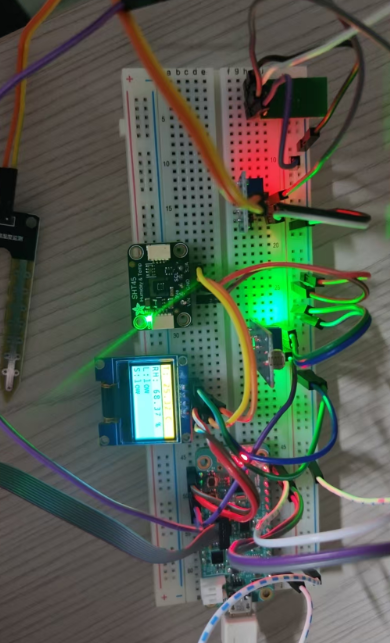
显示数据界面
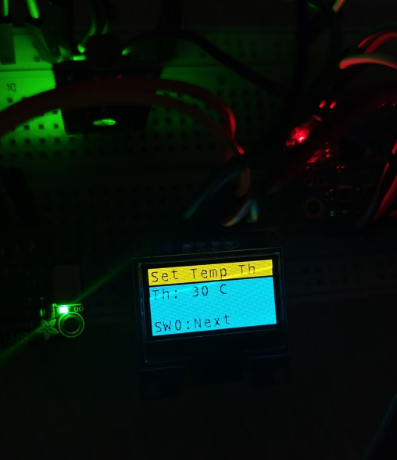
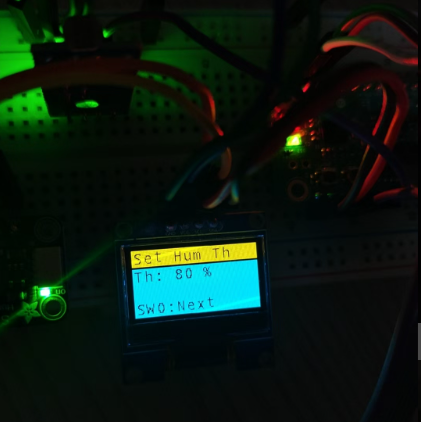
温湿度设置界面,屏幕第二行显示温湿度的阈值,在对应的界面能通过sw1设置对应的阈值
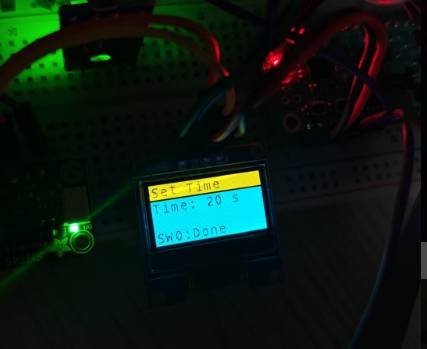
定时浇水设置界面,
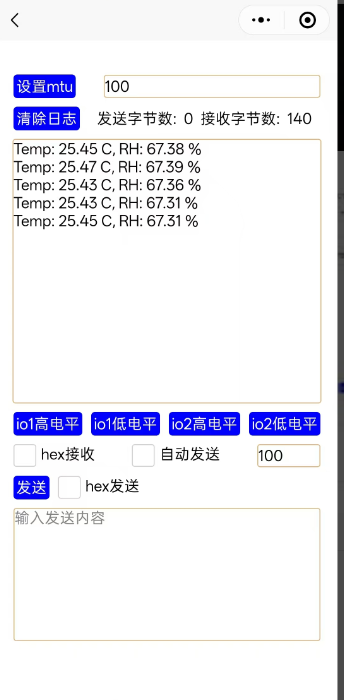
蓝牙接收界面,使用了微信小程序
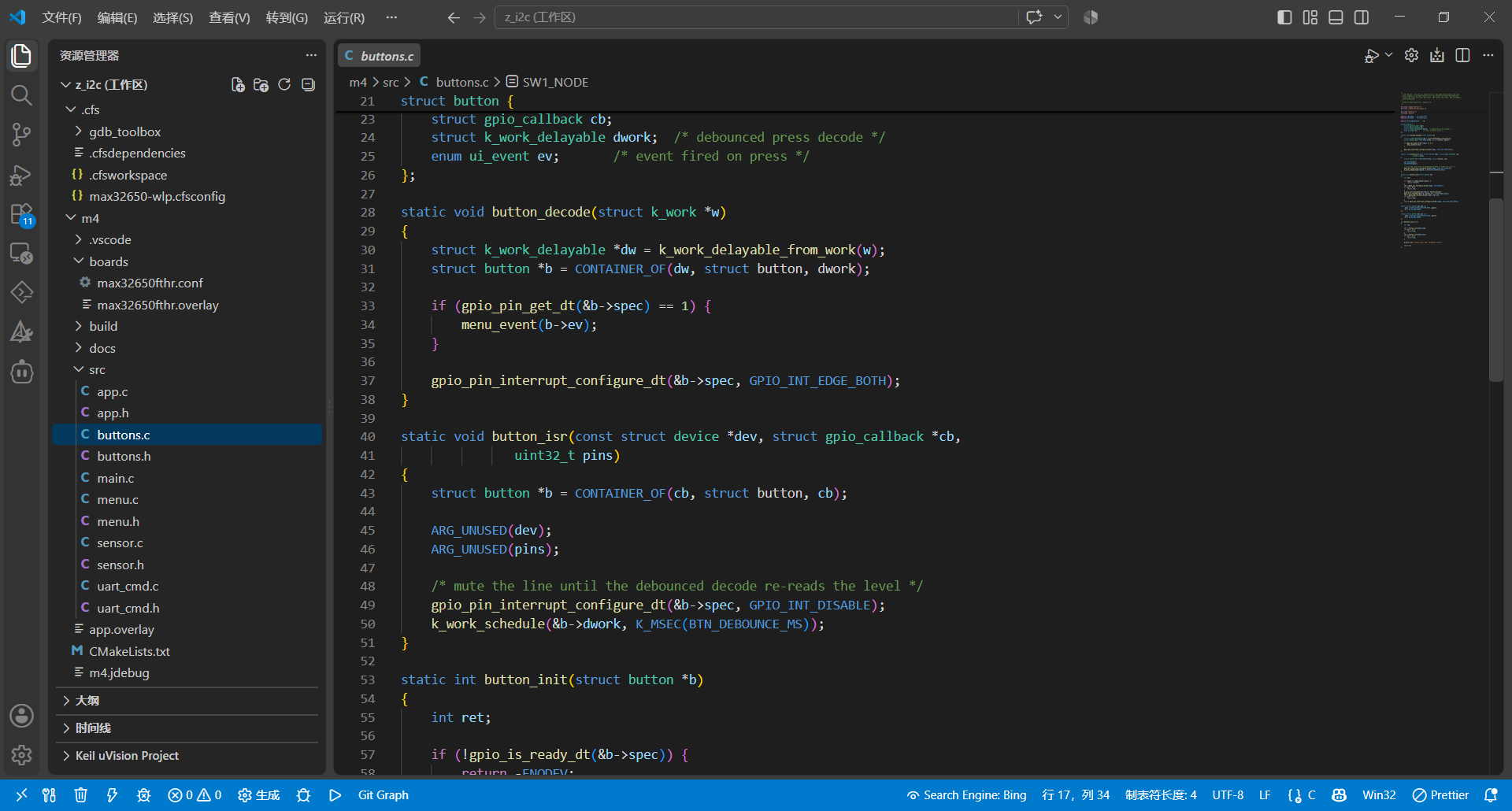
codefusion studio界面
遇到的难点及解决方法
难点:一开始配置的i2c1识别不到0.96oled屏幕,但是基于官方的例程能点亮oled
解决方法:把点不亮的oled项目询问了ai,发现是引脚的电压不匹配,要配置成VDDIOH才能点亮oled
其他的外设配置都要设置成这个电压域才能进行操作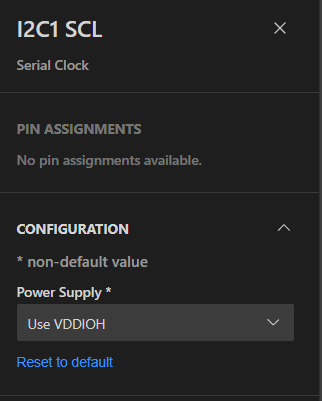
心得体会
感谢电子森林和adi举办的ADI CodeFusion Studio™设计竞赛,我从中学习到了许多zephyr知识,例如线程、消息队列、互斥量、设备树的配置等,体会到了zephyr的便捷性,不需要重复造轮子,直接用现成的,还有如果要替换芯片,更改对应的设备树,上层的代码不需要更改就能成功跑通。

 john42漫游者siche