
内容介绍
内容介绍
项目概述
本项目使用 Zephyr RTOS 在 NXP FRDM-MCXA346 开发板上完成 DigiKey Funpack 5-1 的两个任务要求。
硬件平台
- 开发板: NXP FRDM-MCXA346
- 处理器: MCXA346 (ARM Cortex-M33, 180MHz)
- 内存: 240KB SRAM, 1MB Flash
- 串口: LPUART2 (115200 baud)
软件平台
- RTOS: Zephyr Project
- 工具链: Zephyr SDK / GCC ARM Embedded
任务1:基础任务 - UART 串口输出
任务要求
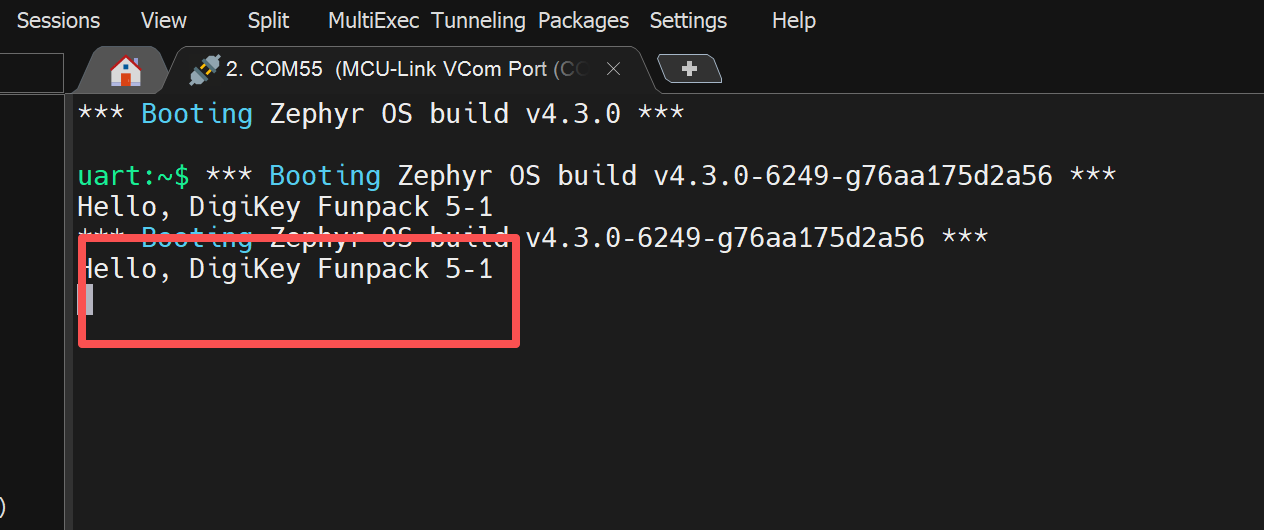
使用 MCXA346 开发板的 UART 串口输出 "Hello, DigiKey Funpack 5-1"
实现方案
1. 项目结构
digikey_funpack/

└── hello/

    ├── CMakeLists.txt

    ├── prj.conf

    └── src/

        └── main.c
2. 配置文件 (prj.conf)
CONFIG_CONSOLE=y
CONFIG_UART_CONSOLE=y
CONFIG_SERIAL=y
CONFIG_PRINTK=y
3. 源代码 (main.c)
#include <zephyr/kernel.h>
#include <zephyr/sys/printk.h>

int main(void)
{
    printk("Hello, DigiKey Funpack 5-1\n");
    return 0;
}
运行方法
# 进入 Zephyr 环境
cd zephyrproject

# 设置环境变量
source zephyr/zephyr-env.sh

# 构建项目
cd digikey_funpack/hello
west build -b frdm_mcxa346
烧录并运行
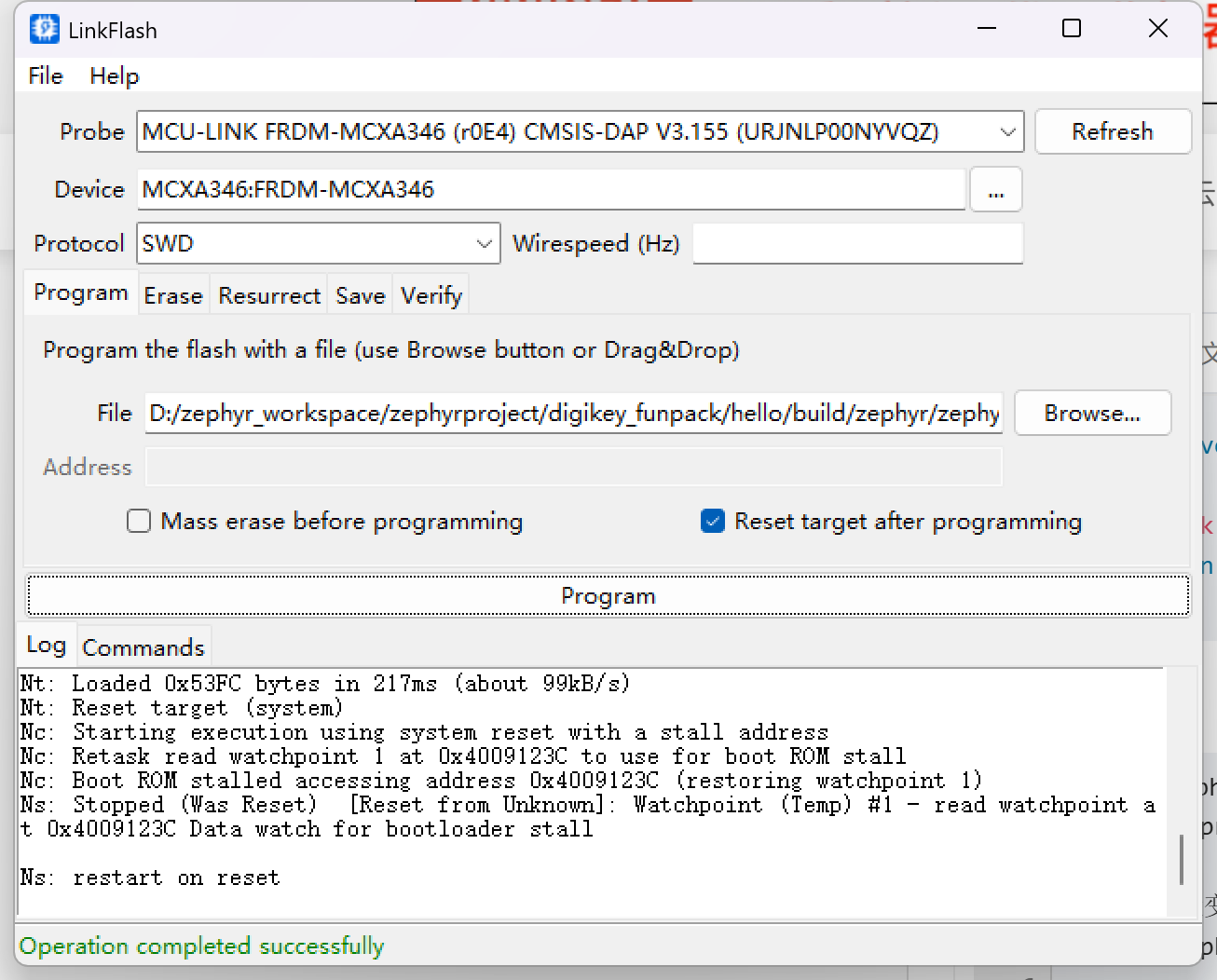
使用LinkFlash进行下载:
预期输出
任务2:进阶任务 - 带缓冲区的 Shell
任务要求
实现一个带缓冲区的 shell,核心功能包括:
1. 命令提示符显示 (`ysh > $`)
2. 循环接收用户输入
3. 输入缓冲区管理
4. 命令解析与执行
5. 控制板载 LED 的颜色和亮度
实现方案
1. 项目结构
digikey_funpack/
└── shell/
    ├── CMakeLists.txt
    ├── prj.conf
    └── src/
        └── main.c
2. 核心功能实现
2.1 代码实现
#include <zephyr/kernel.h>
#include <zephyr/device.h>
#include <zephyr/drivers/gpio.h>
#include <zephyr/sys/printk.h>
#include <zephyr/sys/util.h>
#include <zephyr/console/console.h>
#include <string.h>
#include <stdlib.h>


/* Input buffer configuration */
#define INPUT_BUFFER_SIZE  128
#define MAX_ARGS          16


/* Shell prompt */
#define SHELL_PROMPT      "ysh > $ "


/* LED GPIO specifications */
#define LED_RED_NODE    DT_ALIAS(led0)
#define LED_GREEN_NODE  DT_ALIAS(led1)
#define LED_BLUE_NODE   DT_ALIAS(led2)


static const struct gpio_dt_spec led_red   = GPIO_DT_SPEC_GET(LED_RED_NODE, gpios);
static const struct gpio_dt_spec led_green = GPIO_DT_SPEC_GET(LED_GREEN_NODE, gpios);
static const struct gpio_dt_spec led_blue  = GPIO_DT_SPEC_GET(LED_BLUE_NODE, gpios);


/* Input buffer */
static char input_buffer[INPUT_BUFFER_SIZE];
static int buffer_pos = 0;


/* LED state - brightness 0-100 */
static uint8_t red_brightness = 0;
static uint8_t green_brightness = 0;
static uint8_t blue_brightness = 0;


/* Software PWM state */
static struct k_timer pwm_timer;
static uint8_t pwm_counter = 0;
static volatile uint8_t pwm_period = 100;  /* PWM period */


/* Software PWM callback - runs every 0.1ms (10kHz PWM frequency) */
static void pwm_callback(struct k_timer *timer)
{
    ARG_UNUSED(timer);


    pwm_counter++;
    if (pwm_counter >= pwm_period) {
        pwm_counter = 0;
    }


    /* 根据测试结果修正:brightness=0 全亮,brightness=100 全灭 */
    /* 所以 GPIO 逻辑需要反过来 */


    /* Red LED */
    if (red_brightness == 0) {
        gpio_pin_set_dt(&led_red, 0);  /* On (全亮) */
    } else if (red_brightness >= 100) {
        gpio_pin_set_dt(&led_red, 1);  /* Off (全灭) */
    } else {
        gpio_pin_set_dt(&led_red, pwm_counter < red_brightness ? 1 : 0);
    }


    /* Green LED */
    if (green_brightness == 0) {
        gpio_pin_set_dt(&led_green, 0);  /* On */
    } else if (green_brightness >= 100) {
        gpio_pin_set_dt(&led_green, 1);  /* Off */
    } else {
        gpio_pin_set_dt(&led_green, pwm_counter < green_brightness ? 1 : 0);
    }


    /* Blue LED */
    if (blue_brightness == 0) {
        gpio_pin_set_dt(&led_blue, 0);  /* On */
    } else if (blue_brightness >= 100) {
        gpio_pin_set_dt(&led_blue, 1);  /* Off */
    } else {
        gpio_pin_set_dt(&led_blue, pwm_counter < blue_brightness ? 1 : 0);
    }
}


/* LED control command */
static void cmd_led(int argc, char **argv);


/* Forward declaration */
static void print_prompt(void);


/* Available commands for tab completion */
static const char *commands[] = {
    "help",
    "led",
    "rgb",
    "clear",
    "info",
    "reboot"
};
#define NUM_COMMANDS (sizeof(commands) / sizeof(commands[0]))


/* Tab completion function */
static void tab_complete(void)
{
    int matches = 0;
    int i;
    const char *match = NULL;


    /* Find matches */
    for (i = 0; i < NUM_COMMANDS; i++) {
        if (strncmp(input_buffer, commands[i], buffer_pos) == 0) {
            match = commands[i];
            matches++;
        }
    }


    if (matches == 1 && match != NULL) {
        /* Complete the command */
        printk("\n%s", match);
        strcpy(input_buffer, match);
        buffer_pos = strlen(match);
    } else if (matches > 1) {
        /* Show all matches */
        printk("\n");
        for (i = 0; i < NUM_COMMANDS; i++) {
            if (strncmp(input_buffer, commands[i], buffer_pos) == 0) {
                printk("%s ", commands[i]);
            }
        }
        printk("\n");
        print_prompt();
        printk("%s", input_buffer);
    }
}


/* Simple token parser - compatible with Zephyr */
static char *my_strtok(char *str, const char *delim)
{
    static char *next_token = NULL;
    char *token;


    if (str != NULL) {
        next_token = str;
    }


    if (next_token == NULL) {
        return NULL;
    }


    /* Skip leading delimiters */
    while (*next_token != '\0') {
        const char *d = delim;
        while (*d != '\0') {
            if (*next_token == *d) {
                next_token++;
                break;
            }
            d++;
        }
        if (*d == '\0') {
            break;  /* Not a delimiter */
        }
    }


    if (*next_token == '\0') {
        next_token = NULL;
        return NULL;
    }


    token = next_token;


    /* Find end of token */
    while (*next_token != '\0') {
        const char *d = delim;
        while (*d != '\0') {
            if (*next_token == *d) {
                *next_token = '\0';
                next_token++;
                return token;
            }
            d++;
        }
        next_token++;
    }


    next_token = NULL;
    return token;
}


/* Parse input buffer into arguments */
static int parse_command(char *buffer, char **argv, int max_args)
{
    int argc = 0;
    char *token;


    /* Skip leading spaces */
    while (*buffer == ' ') {
        buffer++;
    }


    /* Parse tokens */
    token = my_strtok(buffer, " \t\r\n");
    while (token != NULL && argc < max_args) {
        argv[argc++] = token;
        token = my_strtok(NULL, " \t\r\n");
    }


    return argc;
}


/* Print help message */
static void print_help(void)
{
    printk("Available commands:\n");
    printk("  help           - Show this help message\n");
    printk("  led <color>   - Turn LED on/off (red, green, blue, all)\n");
    printk("  led <color> <0-100> - Set LED brightness (0-100)\n");
    printk("  rgb <r> <g> <b> - Set RGB LED values (0-100 each)\n");
    printk("  clear          - Clear screen\n");
    printk("  info           - Show board information\n");
    printk("  reboot         - Reboot the board\n");
}


/* LED control command */
static void cmd_led(int argc, char **argv)
{
    if (argc < 2) {
        printk("Usage: led <color> [0-100]\n");
        printk("  colors: red, green, blue, all\n");
        return;
    }


    const char *color = argv[1];


    if (argc == 2) {
        /* Toggle LED */
        if (strcmp(color, "red") == 0) {
            red_brightness = red_brightness ? 0 : 100;
        } else if (strcmp(color, "green") == 0) {
            green_brightness = green_brightness ? 0 : 100;
        } else if (strcmp(color, "blue") == 0) {
            blue_brightness = blue_brightness ? 0 : 100;
        } else if (strcmp(color, "all") == 0) {
            red_brightness = red_brightness ? 0 : 100;
            green_brightness = green_brightness ? 0 : 100;
            blue_brightness = blue_brightness ? 0 : 100;
        } else {
            printk("Unknown color. Use: red, green, blue, all\n");
            return;
        }
    } else {
        /* Set brightness */
        int value = atoi(argv[2]);
        if (value < 0 || value > 100) {
            printk("Brightness must be 0-100\n");
            return;
        }


        if (strcmp(color, "red") == 0) {
            red_brightness = value;
        } else if (strcmp(color, "green") == 0) {
            green_brightness = value;
        } else if (strcmp(color, "blue") == 0) {
            blue_brightness = value;
        } else if (strcmp(color, "all") == 0) {
            red_brightness = value;
            green_brightness = value;
            blue_brightness = value;
        } else {
            printk("Unknown color. Use: red, green, blue, all\n");
            return;
        }
    }


    /* LED is active low, so setting GPIO to 0 turns LED on */
    gpio_pin_set_dt(&led_red, red_brightness > 0 ? 1 : 0);
    gpio_pin_set_dt(&led_green, green_brightness > 0 ? 1 : 0);
    gpio_pin_set_dt(&led_blue, blue_brightness > 0 ? 1 : 0);


    printk("LED: R=%d%% G=%d%% B=%d%%\n", red_brightness, green_brightness, blue_brightness);
}


/* RGB command - set all three LEDs at once */
static void cmd_rgb(int argc, char **argv)
{
    if (argc < 4) {
        printk("Usage: rgb <red> <green> <blue>\n");
        printk("  Each value: 0-100\n");
        return;
    }


    int r = atoi(argv[1]);
    int g = atoi(argv[2]);
    int b = atoi(argv[3]);


    if (r < 0 || r > 100 || g < 0 || g > 100 || b < 0 || b > 100) {
        printk("All values must be 0-100\n");
        return;
    }


    red_brightness = r;
    green_brightness = g;
    blue_brightness = b;


    /* LED is active low, so setting GPIO to 0 turns LED on */
    gpio_pin_set_dt(&led_red, red_brightness > 0 ? 1 : 0);
    gpio_pin_set_dt(&led_green, green_brightness > 0 ? 1 : 0);
    gpio_pin_set_dt(&led_blue, blue_brightness > 0 ? 1 : 0);


    printk("RGB: R=%d%% G=%d%% B=%d%%\n", r, g, b);
}


/* Info command */
static void cmd_info(void)
{
    printk("========================================\n");
    printk("  DigiKey Funpack 5-1 - Shell Demo\n");
    printk("  Board: NXP FRDM-MCXA346\n");
    printk("  Zephyr RTOS\n");
    printk("========================================\n");
    printk("LED Status: R=%d%% G=%d%% B=%d%%\n",
           red_brightness, green_brightness, blue_brightness);
}


/* Clear screen command */
static void cmd_clear(void)
{
    /* ANSI escape code to clear screen */
    printk("\033[2J\033[H");
}


/* Process command */
static void process_command(char *buffer)
{
    char *argv[MAX_ARGS];
    int argc;


    /* Skip empty lines */
    if (buffer[0] == '\0' || buffer[0] == '\n') {
        return;
    }


    /* Parse command */
    argc = parse_command(buffer, argv, MAX_ARGS);


    if (argc == 0) {
        return;
    }


    /* Execute command */
    if (strcmp(argv[0], "help") == 0) {
        print_help();
    } else if (strcmp(argv[0], "led") == 0) {
        cmd_led(argc, argv);
    } else if (strcmp(argv[0], "rgb") == 0) {
        cmd_rgb(argc, argv);
    } else if (strcmp(argv[0], "clear") == 0) {
        cmd_clear();
    } else if (strcmp(argv[0], "info") == 0) {
        cmd_info();
    } else if (strcmp(argv[0], "reboot") == 0) {
        printk("Reboot command not available\n");
    } else {
        printk("Unknown command: %s\n", argv[0]);
        printk("Type 'help' for available commands.\n");
    }
}


/* Print prompt */
static void print_prompt(void)
{
    printk("%s", SHELL_PROMPT);
}


/* UART device */
int main(void)
{
    uint8_t c;


    printk("Initializing DigiKey Funpack 5-1 Shell...\n");


    /* Initialize console */
    console_init();
    printk("Console initialized\n");


    /* Initialize LEDs */
    if (device_is_ready(led_red.port)) {
        gpio_pin_configure_dt(&led_red, GPIO_OUTPUT);
        gpio_pin_set_dt(&led_red, 1);  /* Off (active low) */
        printk("Red LED initialized\n");
    }


    if (device_is_ready(led_green.port)) {
        gpio_pin_configure_dt(&led_green, GPIO_OUTPUT);
        gpio_pin_set_dt(&led_green, 1);  /* Off (active low) */
        printk("Green LED initialized\n");
    }


    if (device_is_ready(led_blue.port)) {
        gpio_pin_configure_dt(&led_blue, GPIO_OUTPUT);
        gpio_pin_set_dt(&led_blue, 1);  /* Off (active low) */
        printk("Blue LED initialized\n");
    }


    /* Initialize and start software PWM timer - 0.1ms period (10kHz) */
    k_timer_init(&pwm_timer, pwm_callback, NULL);
    k_timer_start(&pwm_timer, K_USEC(100), K_USEC(100));
    printk("Software PWM started (10kHz)\n");


    /* Initialize buffer */
    buffer_pos = 0;
    memset(input_buffer, 0, sizeof(input_buffer));


    /* Welcome message */
    printk("\n");
    printk("========================================\n");
    printk("  DigiKey Funpack 5-1 - Shell Demo\n");
    printk("  Board: NXP FRDM-MCXA346\n");
    printk("  Zephyr RTOS\n");
    printk("========================================\n");
    printk("Type 'help' for available commands.\n");
    printk("\n");


    /* Print prompt */
    print_prompt();


    /* Main loop - read characters from console */
    while (1) {
        /* Read character from console (blocking) */
        /* Read character from UART (polling) */
        /* Read character from console (blocking) */
        c = console_getchar();
        if (c < 0) {
            k_yield();
            continue;
        }


        /* Handle character */
        switch (c) {
            case '\r':
            case '\n':
                /* Enter key - process command */
                printk("\r\n");
                if (buffer_pos > 0) {
                    input_buffer[buffer_pos] = '\0';
                    process_command(input_buffer);
                    buffer_pos = 0;
                    memset(input_buffer, 0, sizeof(input_buffer));
                }
                print_prompt();
                break;


            case '\b':
            case 0x7F:
                /* Backspace / Delete - delete character */
                if (buffer_pos > 0) {
                    buffer_pos--;
                    printk("\b \b");  /* Erase character */
                }
                break;


            case '\t':
                /* Tab - auto-complete */
                tab_complete();
                break;


            default:
                /* Regular character - add to buffer */
                if (buffer_pos < (INPUT_BUFFER_SIZE - 1) && c >= 0x20 && c <= 0x7E) {
                    input_buffer[buffer_pos++] = c;
                    printk("%c", c);  /* Echo */
                }
                break;
        }


        k_yield();
    }


    return 0;
}
缓冲区管理包括:
- 字符接收与存储
- 退格键处理 (删除字符)
- 回车键处理 (执行命令)
- 特殊字符过滤 (仅接受可打印 ASCII 字符)
2.2 命令解析
使用自定义的 `my_strtok` 函数进行命令行解析,支持:
- 空格和tab 作为分隔符
- 最多16个参数
2.3 LED控制
板载RGB LED GPIO 定义:
- 红色 LED:GPIO3_18
- 绿色 LED:GPIO3_19
- 绿色 LED:GPIO3_21
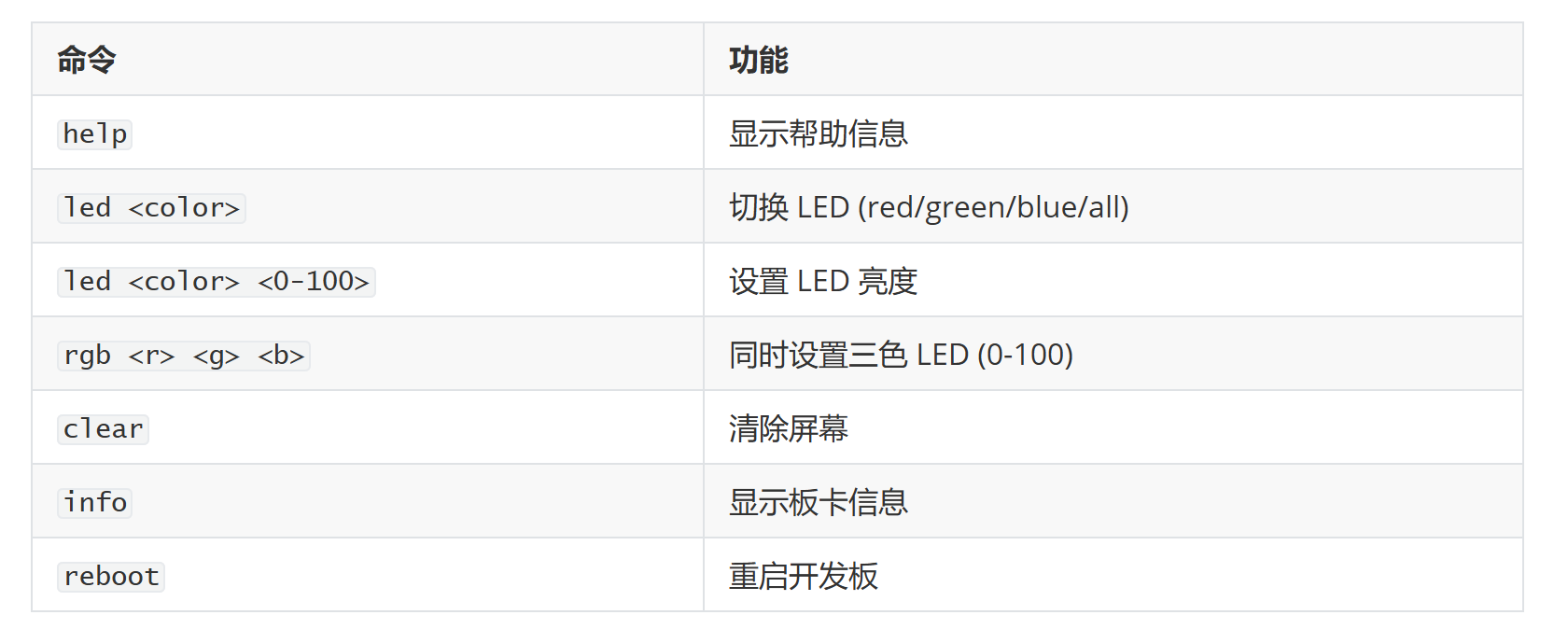
2.4 支持的命令
3. 源代码 (main.c)
主要函数:
- my_strtok() - 命令行解析
- parse_command() - 参数解析
- process_command() - 命令处理分发
- cmd_led() - LED 控制命令
- cmd_rgb() - RGB 同时控制
- cmd_info() - 显示信息
- cmd_clear() - 清屏
- print_help() - 帮助信息
运行方法
# 构建项目
cd digikey_funpack/shell
west build -b frdm_mcxa346
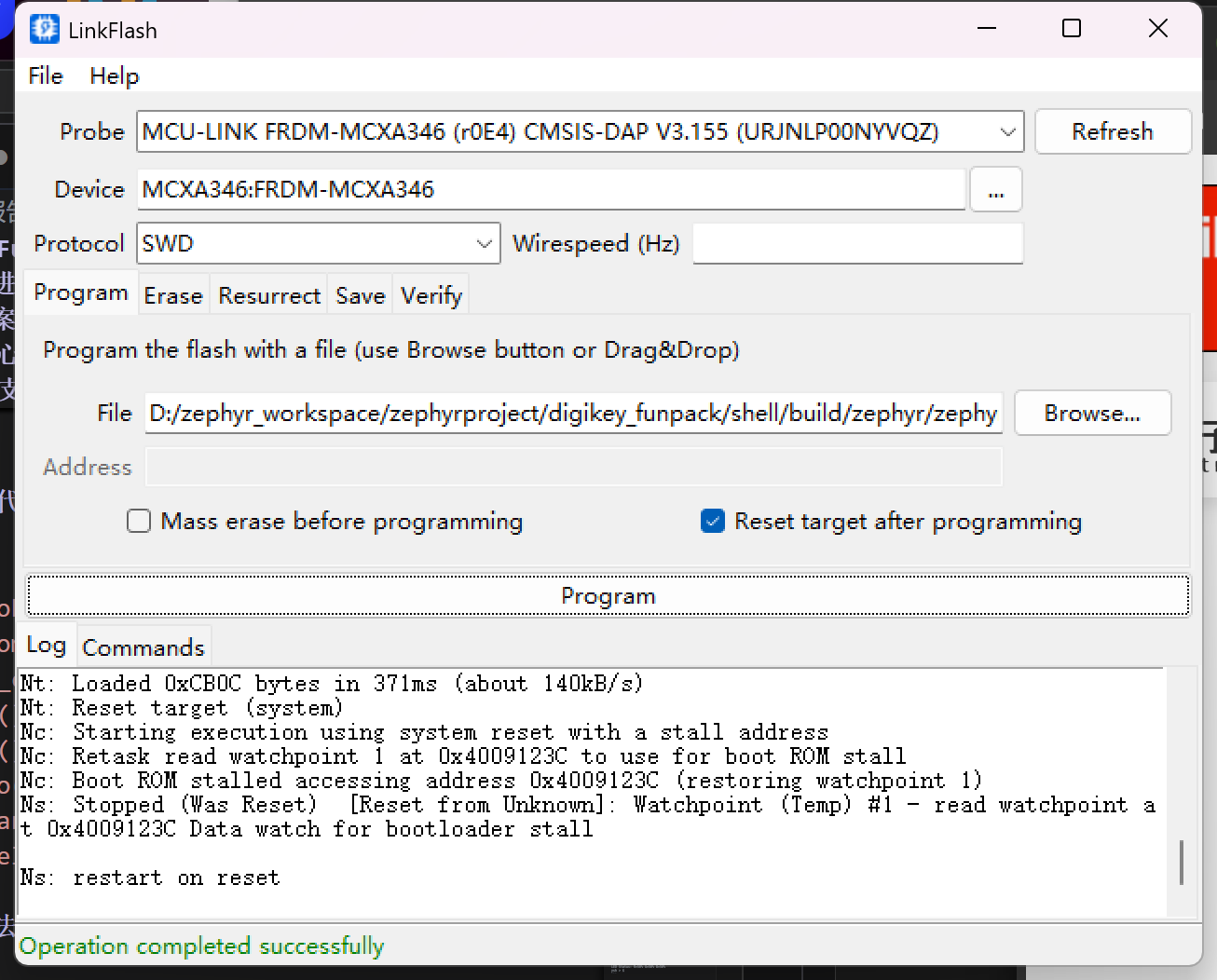
烧录
交互示例:
ysh > $ rgb 50 50 50
RGB: R=50% G=50% B=50%   led灯50%的亮度
ysh > $ rgb 100 100 100
RGB: R=100% G=100% B=100%  led灯1000%的亮度
ysh > $ rgb 0 0 0
RGB: R=0% G=0% B=0%  led灯全灭
ysh > $ led blue
LED: R=0% G=0% B=100%  打开蓝灯
ysh > $ led blue
LED: R=0% G=0% B=0%    关闭蓝灯
ysh > $ led red
LED: R=100% G=0% B=0%   打开红灯
ysh > $
附件下载

hello.zip
输出Hello, DigiKey Funpack 5-1
shell.zip
shell控制台使用命令控件帽LED
团队介绍
本人为个人创客爱好者
评论
0 / 100
查看更多
猜你喜欢
Funpack5-1 - 基于FRDM-MCXA346实现shell控制RGB LED该项目使用了FRDM-MCXA346开发板,实现了shell控制板载RGB灯的设计,它的主要功能为:串口输入内容处理,PWM控制RGB灯。
 FuShenxiao
245
Funpack5-1 - 基于NXP FRDM-MCXA346实现RGB LED Shell控制该项目使用了FRDM-MCXA346,实现了RGB LED Shell控制的设计,它的主要功能为:NXP FRDM-MCXA346实现RGB LED Shell控制。
冲向天空的猪201
Funpack5-1 - 基于FRDM-MCXA346实现串口Shell控制板载RGB该项目使用了FRDM-MCXA346,实现了Shell控制板载RGB LED的设计,它的主要功能为:实现一个带缓冲区的shell,核心是实现一个带缓冲区的shell,程序需能显示命令提示符,并循环接收用户输入,并能进行基本的命令解析。例如:实现简单的指令控制板载的LED的颜色和亮度。。
 EPTmachine
159