
Wio Terminal 板卡介绍:
Wio Terminal 基本参数
Wio Terminal 引脚
Wio Terminal 板卡上手:
Git下载:
cd ~
git clone https://github.com/Seeed-Studio/ambd_flash_toolcd ~
git clone https://github.com/Seeed-Studio/ambd_flash_toolcd ambd_flash_tool.\ambd_flash_tool.exe erase注意:初始擦除过程可能需要一段时间。请耐心等待,不要关闭窗口
对于 Windows
进入目录
cd ambd_flash_tool当您在ambd_flash_tool目录中时,执行以下命令将最新固件刷入 RTL8720
.\ambd_flash_tool.exe flash从 Arduino IDE 检查 RTL8720 固件版本
Wi-Fi 所需的库
我们需要以下库才能在 Wio 终端上开始使用 Wi-Fi。您可以通过在 Arduino 库管理器的搜索框中键入库名称来搜索这些库。
- Seeed_Arduino_rpcWiFi - 搜索"seeed rpcwifi"
- Seeed_Arduino_rpcUnified - 搜索"seeed rpcunified"
- Seeed_Arduino_mbedtls - 搜索"seeed mbedtls"
- Seeed_Arduino_FS - 搜索"seeed fs"
- Seeed_Arduino_SFUD - 搜索"seeed sfud"
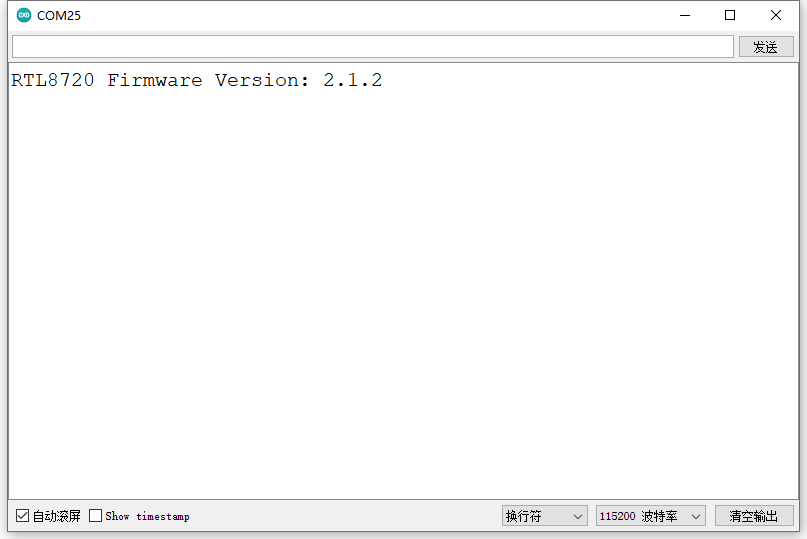
安装上述固件后,可以通过Arduino IDE上传以下代码到Wio终端来检查固件是否安装正确。
#include "rpcWiFi.h"

void setup() {
    Serial.begin(115200);
    while(!Serial); // Wait to open Serial Monitor
    Serial.printf("RTL8720 Firmware Version: %s", rpc_system_version());
}

void loop() {
}
本期任务:
任务要求:
1.联网查询
2.温湿度值
3.天气情况
4.空气质量
5.未来三天内的天气
//获取日期数据
etTimeJSON = Get_Json_Date("http://api.k780.com/?app=life.time&appkey=10003&sign=b59bc3ef6191eb9f747dd4e83c99f2a4&format=json&tdsourcetag=s_pctim_aiomsg");

//获取天气数据
GetWeatherJSON = Get_Json_Date("http://api.openweathermap.org/data/2.5/weather?id=" + CityId + "&units=metric&appid=" + OpenWeatherApiKey);

//获取空气质量数据
GetAQIJSON = Get_Json_Date("http://api.openweathermap.org/data/2.5/weather?lat=" + Citylat + "&lon=" + Citylon + "&appid=" + OpenWeatherApiKey);

//获取未来三天天气数据
GetFuture_WeatherJSON = Get_Json_Date("https://api.openweathermap.org/data/2.5/forecast?id=" + CityId + "&units=metric&appid=" + OpenWeatherApiKey");
void Get_Weather_Date(String url){//获取天气数据

    if((WiFi.status() == WL_CONNECTED)) {

        HTTPClient http;
        Serial.print("[HTTP] begin...\n");

        http.begin(url); //HTTP
        Serial.print("[HTTP] GET...\n");
        //发送HTTP请求
        int httpCode = http.GET();
        // httpCode在出现错误时为负值
        if(httpCode > 0) {
            // HTTP标头已发送,服务器响应标头已处理
            Serial.printf("[HTTP] GET... code: %d\n", httpCode);
            //得到JSON信息,开始解析
            if(httpCode == HTTP_CODE_OK) {
                String payload = http.getString();
                Serial.println(payload);//打印请求的JSON
            }
        } else {
            Serial.printf("[HTTP] GET... failed, error: %s\n", http.errorToString(httpCode).c_str());
        }
        http.end();
    }
    }
第二步:解析JSON内容
以当天天气为例
void Weather_JsonDate()
{

    GetWeatherJSON = Get_Json_Date("http://api.openweathermap.org/data/2.5/weather?id=" + CityId + "&units=metric&appid=" + OpenWeatherApiKey);  // 获取当前天气

    StaticJsonDocument<600> doc;
    deserializeJson(doc, GetWeatherJSON);
    //地址位置
    JsonObject coored = doc["coord"];
    lon = coored["lon"];
    Citylon = lon;
    Serial.println(lon);
    lat = coored["lat"];
    Citylat = lat;
    Serial.println(lat);
     // 获取天气状况
    JsonArray weather_A = doc["weather"];
    JsonObject weather = weather_A[0];

    Serial.println("icon = ");
    icon_current = weather["icon"];
    Serial.println(icon_current);

    description = weather["description"].as<const char*>();
    Serial.println(description);

    // 获取温湿度
    JsonObject main = doc["main"];
    temp_current = main["temp"];
    Serial.println(temp_current);
    humidity_current = main["humidity"];
    Serial.println(humidity_current);

    pressure_current = main["pressure"];
    Serial.println(pressure_current);
    feels_like_current = main["feels_like"];
    Serial.println(feels_like_current);
    temp_max = main["temp_max"];
    Serial.println(temp_max);
    temp_min = main["temp_min"];
    Serial.println(temp_min);
}如果需要在代码中逐一调试,我们还需要对Json数据进行转义
第三部:判断空气质量(文字采用tft群取模)
//?判断空气质量并显示
void ShowWeatherAQI(int32_t x, int32_t y, int32_t aqi_val)
{
    switch (aqi_val)
    {
    case 1: // 优 绿色
        tft.drawBitmap(x , y , W_AQI + 16 * 8 * 4, 32, 32, TFT_GREEN);
        break;
    case 2: // 良 黄色
        tft.drawBitmap(x , y , W_AQI + 16 * 8 * 5, 32, 32, TFT_YELLOW);
        break;
    case 3: // 轻度污染 橙色
        tft.drawBitmap(x , y , W_AQI + 16 * 8 * 6, 32, 32, TFT_ORANGE);
        tft.drawBitmap(x + 35 , y , W_AQI + 16 * 8 * 7, 32, 32, TFT_ORANGE);
        break;
    case 4:// 中度污染 红色
        tft.drawBitmap(x , y , W_AQI + 16 * 8 * 10, 32, 32, TFT_RED);
        tft.drawBitmap(x + 35, y , W_AQI + 16 * 8 * 7, 32, 32, TFT_RED);
        break;
    case 5: // 重度污染 紫色
        tft.drawBitmap(x , y , W_AQI + 16 * 8 * 11, 32, 32, TFT_PURPLE);
        tft.drawBitmap(x + 35 , y , W_AQI + 16 * 8 * 7, 32, 32, TFT_PURPLE);
        break;
    case 6: // 严重污染 褐红色
        tft.drawBitmap(x , y, W_AQI + 16 * 8 * 12, 32, 32, 0xf81f);
        tft.drawBitmap(x + 35, y, W_AQI + 16 * 8 * 11, 32, 32, 0xf81f);
        break;
    default:
        tft.drawBitmap(x , y + 32, W_AQI + 16 * 8 * 4, 32, 32, TFT_WHITE);
        break;
    }
}
第四步:通过NTP获取时间
#include <WiFiUdp.h>
#include <TimeLib.h>
#include <NTPClient.h>
// WiFi信息
const char* ssid = "SSDI";
const char* password =  "wifipassword";

//网络授时时间
WiFiUDP ntpUDP;
NTPClient timeClient(ntpUDP, "ntp1.aliyun.com", 60 * 60 * 8, 30 * 60 * 1000);

String nowTime = "";

//?主程序初始化
void setup() {
    //串口初始化
    Serial.begin(115200);
    //WiFi初始化
    WiFi_INIT();
    //连接NTP服务器(阿里的NTP服务器)
    timeClient.begin();
}

//?主程序循坏
void loop() {
Serial.println(nowtime);
}
整体源码在文章附件当中
参考网址:
Arduino 在线json教程https://arduinojson.org/v6/example/
原文地址:https://wiki.seeedstudio.com/Wio-Terminal-Network-Overview/
项目地址:https://www.eetree.cn/project/detail/601
屏幕坐标系
总结与分享:
Wio Terminal 是一块不错学习板卡,尤其是物联网领域的学生,工程师或创客。板卡自身携带WiFi,蓝牙功能,存储的Flash多达4MB,还支持SD卡拓展,本次我做的任务②,涉及到网络解析方便比较多,同时我也把这款板卡首次上手到编程学习,从头记录一遍,给我的印象非常深刻,感谢硬禾学堂提供的Funpack活动,我只能说Funpack太赞了!

 luckydarcy
 孙悟空SyntaxError