
项目介绍
本项目依托Funpack3-5活动,基于beagle bone black开发板的PRU硬件,实现beagle bone black读取按键状态,并逐渐增大LED灯闪烁周期的功能。当LED灯闪烁周期增大到特定值时,自动恢复默认值。
项目任务(此处选择任务一)
任务1:点灯!使用PRU控制一个LED实现呼吸灯,并且使用一个按键按下后切换闪烁的速度
设计思路
使用bbb-pru-examples作为底层框架,结合example程序,自行测试融合项目任务所需相关要求的功能代码。项目中使用到了按键采集以及LED灯控制等功能。当然开发过程并不是一帆风顺,多多少少会有一些小坑,这些坑我会在结尾总结。
参考资料网址链接:https://github.com/ejthesnaar/bbb-pru-examples
因PRU无法直接输出PWM信号,此处使用了软件模拟的方式(快速交替点亮与关闭LED灯)实现的呼吸灯的效果。在总体运行周期不变的情况下,通过逐周期增加LED灯点亮时间的占比达到灯逐渐变亮的效果,同理,当灯完全点亮时,再逐周期降低灯点亮的时间,以达到LED灯逐渐熄灭的效果。

以上即为设计思路。具体软件流程后面详细介绍。
硬件介绍
BeagleBone® Black 是一款面向开发人员和业余爱好者的低成本、高扩展、并有社区支持的开发平台。处理器选用了TI AM3358芯片,基于ARM Cortex-A8架构处理器。还配备了丰富的扩展资源,包括HDMI接口、以太网、SD 卡槽、并预留了足够多的管脚用于AD转换、LCD显示屏、PWM输出、I2C、串口等等。板卡可运行完整的 Linux 系统,且支持多种编程语言。
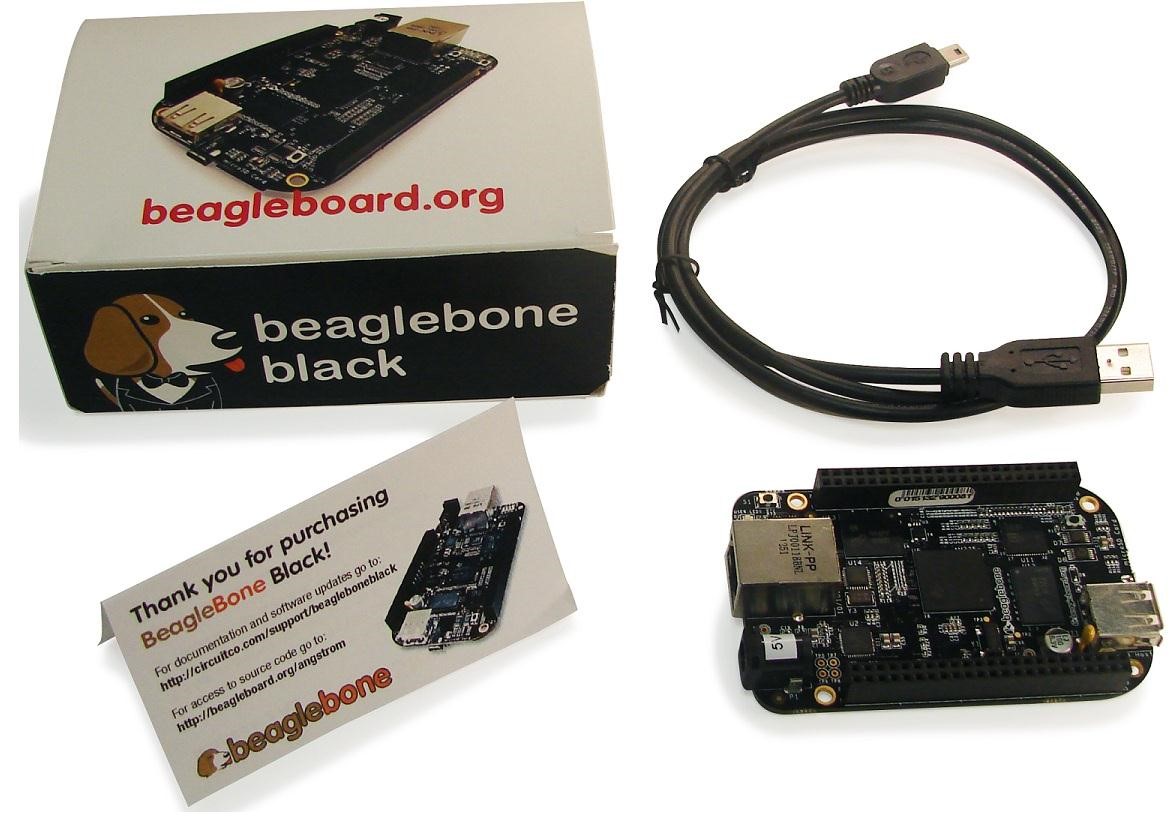
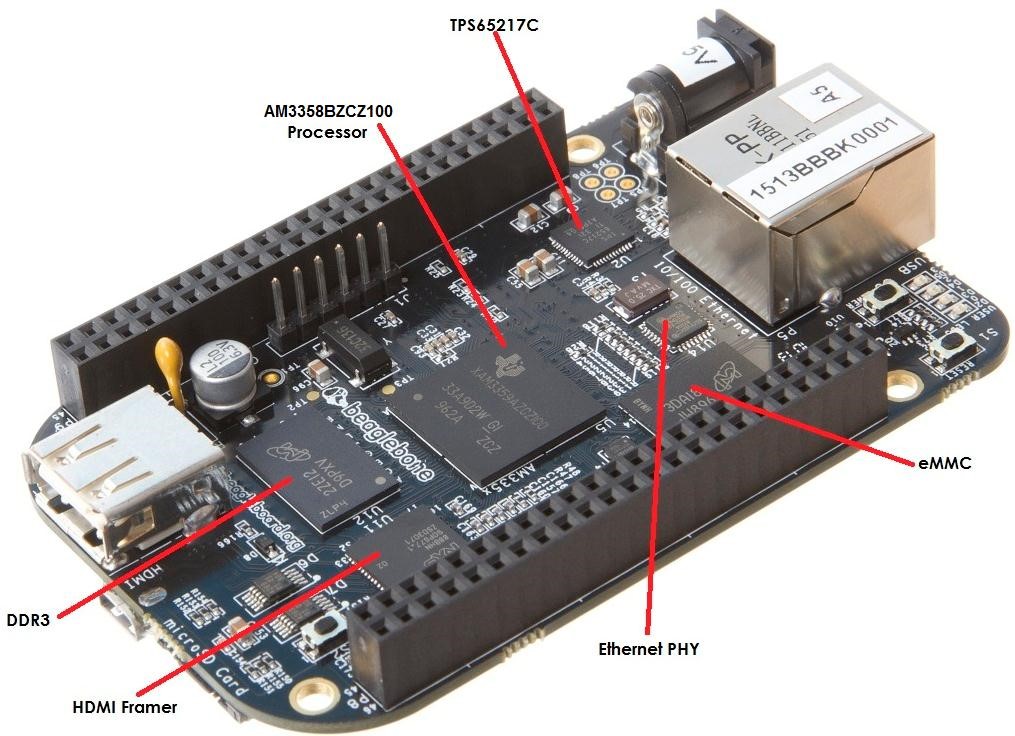
BeagleBone Black 采用 TI 的 Sitara™ AM3359 ARM Cortex™-A8 微处理器,运行速度为 1 GHz (2000 DMIPS),远超 Raspberry Pi 板上的 720 MHz 器件。 最值得注意的是,除了 400 MHz 的 512 MB DDR3 外 Black 还配备了 2 GB 板载闪存。 板上还有一个 D 型 HDMI 微型连接器、以太网和 USB 端口,采用 5 VDC 单电源。 电流消耗仅 250 mA,因此还可采用 USB 供电。
在软件方面,Black 预装了众多软件,随时可以启动。 仅需连接电源、HDMI、以太网和 USB 键盘/鼠标,该板即能引导 Angstrom Linux 发行版,为您呈现 Gnome 桌面。 4 个用户 LED (USR0 - 3) 在引导过程中会闪烁,用于指示活动状态。 从随附的 Chromium、Firefox 和 Epiphany 浏览器中选定一个后,您在数秒后就可体验网上冲浪。 该板与 Raspberry Pi 不同,在初次运行前不需要添加 SD 闪存卡,也不需要象杂耍似得下载 Linux 发行版。 对于大多数开发人员和爱好者来说,尽管 Angstrom Linux 适合他们,但基于 Cortex-A8 的设备采用了 ARM v7 架构,因此 Black 也可运行 Ubuntu 或者 Android 系统。 Linux 在开发板上的另一个用途是通过以太网接口实现的更多连接功能。 因此,除了能连接 Black 的专用网络服务器外,使用 FTP、SSH、Telnet 和其他远程访问服务还提高了连接灵活性。
收到开发板后,可根据自己需要选择是否升级系统镜像。
https://www.beagleboard.org/distros/am335x-11-7-2023-09-02-4gb-emmc-iot-flasher
我使用的是IOT版本的镜像,相较于XFCE版本的镜像,用户可用磁盘空间相对较大。
相关指导链接
https://docs.beagleboard.org/intro/beagle101/blinkLED.html
https://docs.beagleboard.org/books/beaglebone-cookbook/index.html#bone-cook-book-home
使用以下命令开启vscode编辑器
sudo systemctl start bb-code-server
sudo systemctl start bb-code-server
sudo systemctl add-wants multi-user.target bb-code-server
安装相关软件包
sudo apt install flex bison gcc gcc-pru gnuprumcu cmake
PRU权限设置(这个很重要, 具体指导可点击链接https://docs.beagleboard.org/books/pru-cookbook/02start/start.html)
sudo chown debian:debian /lib/firmware/am335x-pru*
开源库下载
https://github.com/ejthesnaar/bbb-pru-examples.git
安装好之后就可以编写代码了。
软件流程逻辑图
硬件连接原理图
P9_27(GPIO_125) --> 连接按键
P9_30(GPIO_112) --> 连接LED灯
功能展示
LED灯熄灭
LED灯点亮
LED灯闪烁中间状态(亮度不高)
主要代码片段
/*
 * Source Modified by Emile Thesnaar <emilethes@gmail.com>
 * Based on modifications by Zubeen Tolani <zeekhuge@gmail.com>
 * Based on the examples distributed by TI
 *
 * Copyright (C) 2015 Texas Instruments Incorporated - http://www.ti.com/
 *
 *
 * Redistribution and use in source and binary forms, with or without
 * modification, are permitted provided that the following conditions
 * are met:
 *
 *  * Redistributions of source code must retain the above copyright
 *    notice, this list of conditions and the following disclaimer.
 *
 *  * Redistributions in binary form must reproduce the above copyright
 *    notice, this list of conditions and the following disclaimer in the
 *    documentation and/or other materials provided with the
 *    distribution.
 *
 *  * Neither the name of Texas Instruments Incorporated nor the names of
 *    its contributors may be used to endorse or promote products derived
 *    from this software without specific prior written permission.
 *
 * THIS SOFTWARE IS PROVIDED BY THE COPYRIGHT HOLDERS AND CONTRIBUTORS
 * "AS IS" AND ANY EXPRESS OR IMPLIED WARRANTIES, INCLUDING, BUT NOT
 * LIMITED TO, THE IMPLIED WARRANTIES OF MERCHANTABILITY AND FITNESS FOR
 * A PARTICULAR PURPOSE ARE DISCLAIMED. IN NO EVENT SHALL THE COPYRIGHT
 * OWNER OR CONTRIBUTORS BE LIABLE FOR ANY DIRECT, INDIRECT, INCIDENTAL,
 * SPECIAL, EXEMPLARY, OR CONSEQUENTIAL DAMAGES (INCLUDING, BUT NOT
 * LIMITED TO, PROCUREMENT OF SUBSTITUTE GOODS OR SERVICES; LOSS OF USE,
 * DATA, OR PROFITS; OR BUSINESS INTERRUPTION) HOWEVER CAUSED AND ON ANY
 * THEORY OF LIABILITY, WHETHER IN CONTRACT, STRICT LIABILITY, OR TORT
 * (INCLUDING NEGLIGENCE OR OTHERWISE) ARISING IN ANY WAY OUT OF THE USE
 * OF THIS SOFTWARE, EVEN IF ADVISED OF THE POSSIBILITY OF SUCH DAMAGE.
 */


#include <stdint.h>
#include <pru_cfg.h>
#include "resource_table_empty.h"


volatile register uint32_t __R30;
volatile register uint32_t __R31;


/* control the led breath cycler time */
int stepCount = 1;


/* for led breath use */
int blinkDir = 1;
int dutyCount = 1;
int cyclerCount = 1000;


/* middle value */
int delayCount = 0;


void main(void)
{
    volatile uint32_t gpio;
    volatile uint32_t gpio_key;


    /* Clear SYSCFG[STANDBY_INIT] to enable OCP master port */
    CT_CFG.SYSCFG_bit.STANDBY_INIT = 0;


    /* Toggle GPO 7. For PRU 0 this is P9_25 */
    gpio = 0x0004;
    /* gpio key 5. For PRU 0 this is P9_27*/
    gpio_key = 0x0020;


    /* Toggle indefinitely at 1 Hz*/
    /*
    100,000,000
    */
    while (1) {
        int i = 0;


        if (__R31 & gpio_key)
        {
            while (__R31 & gpio_key)
            {
                __delay_cycles(1);
            }
            stepCount = stepCount + 1;
            if (stepCount > 10)
            {
                stepCount = 1;
            }
        }


        /* led on */
        __R30 ^= gpio;
        delayCount = dutyCount * stepCount * 3;
        for(i=0; i<delayCount; i++)
        {
            __delay_cycles(1);
        }

        /* led off */
        __R30 ^= gpio;
        delayCount = (cyclerCount - dutyCount) * stepCount * 3;
        for(i=0; i<delayCount; i++)
        {
            __delay_cycles(1);
        }


        if (blinkDir)
        {
            dutyCount = dutyCount + 1;
            if (dutyCount >= cyclerCount)
            {
                blinkDir = 0;
            }
        }
        else
        {
            dutyCount = dutyCount - 1;
            if (dutyCount == 0)
            {
                blinkDir = 1;
            }
        }
    }
}
#! /bin/bash


##############################################################################
#
# Copyright (C) 2018 Emile Thesnaar <emilethes@gmail.com>
#
#
# Redistribution and use in source and binary forms, with or without
# modification, are permitted provided that the following conditions
# are met:
#
#   * Redistributions of source code must retain the above copyright
#     notice, this list of conditions and the following disclaimer.
#
#   * Redistributions in binary form must reproduce the above copyright
#     notice, this list of conditions and the following disclaimer in the
#     documentation and/or other materials provided with the
#     distribution
#
#
# THIS SOFTWARE IS PROVIDED BY THE COPYRIGHT HOLDERS AND CONTRIBUTORS
# "AS IS" AND ANY EXPRESS OR IMPLIED WARRANTIES, INCLUDING, BUT NOT
# LIMITED TO, THE IMPLIED WARRANTIES OF MERCHANTABILITY AND FITNESS FOR
# A PARTICULAR PURPOSE ARE DISCLAIMED. IN NO EVENT SHALL THE COPYRIGHT
# OWNER OR CONTRIBUTORS BE LIABLE FOR ANY DIRECT, INDIRECT, INCIDENTAL,
# SPECIAL, EXEMPLARY, OR CONSEQUENTIAL DAMAGES (INCLUDING, BUT NOT
# LIMITED TO, PROCUREMENT OF SUBSTITUTE GOODS OR SERVICES; LOSS OF USE,
# DATA, OR PROFITS; OR BUSINESS INTERRUPTION) HOWEVER CAUSED AND ON ANY
# THEORY OF LIABILITY, WHETHER IN CONTRACT, STRICT LIABILITY, OR TORT
# (INCLUDING NEGLIGENCE OR OTHERWISE) ARISING IN ANY WAY OUT OF THE USE
# OF THIS SOFTWARE, EVEN IF ADVISED OF THE POSSIBILITY OF SUCH DAMAGE.
#
#############################################################################


# Clean outputs, then build.
make clean
make


# Stop PRU0
sudo sh -c 'echo stop > /sys/class/remoteproc/remoteproc1/state'


# Load firmware
sudo cp gen/*.out /lib/firmware/am335x-pru0-fw


# Configure pin
config-pin P9_30 pruout
config-pin -q P9_30


config-pin P9_27 pruin
config-pin -q P9_27


# Start PRU 0 (remoteproc1 = PRU 0)
sudo sh -c 'echo am335x-pru0-fw > /sys/class/remoteproc/remoteproc1/firmware'
sudo sh -c 'echo start > /sys/class/remoteproc/remoteproc1/state'


echo "Done.  PRU should now toggle pin 25 on header 9."
心得体会
感谢主办方提供平台,使我们有机会体验beagle bone black开发流程,这里总结了一些开发技巧和大家分享。开发过程中需要多查找资料,结合各平台博客以及视频分享教程,排查遇到问题。
遇到问题
问题一,加载程序时提示权限不足
解决办法:此处最开始以为root权限可们组条件,后面加上sudo后依旧提示权限不足。最终无意间发现
需要变更PRU所有权-->sudo chown debian:debian /lib/firmware/am335x-pru*
所有权变更后,程序可正常加载
问题二,LED亮灭变化周期需要手动调整,参数设置异常无法达到闪烁的效果。
解决办法:反复调整参数。
至此项目发表完毕,欢迎大家在评论区交流经验。

 oxlm
oxlm 苏格拉没有底57SSG